MMO mice · WoW and FFXIV

Razer Naga V3 Pro vs Naga V2 HyperSpeed

The Naga V2 HyperSpeed is the fixed 12-button mouse. The Naga V3 Pro adds plates you can swap, a USB-C cable, and a lockable ring-finger button.

Which Naga should you buy?

Get the Razer Naga V2 HyperSpeed if you want the fixed 12-button grid from the WoW gear guide. Get the Razer Naga V3 Pro if you want magnetic 12-, 6-, and 2-button plates, a USB-C cable, and a lockable ring-finger button. For a bar that stays on twelve thumb buttons, the HyperSpeed is the better buy.

AssessmentManufacturer specifications and the cited measurements
Decision pointA fixed 12-button grid against plates, a cable, and one extra button

Choose by the grid you will actually use

The HyperSpeed keeps one 12-button wall and an AA. The V3 Pro keeps a 12-button plate and lets you take it off.

We don't run ads but we do have affiliate links for some products. As an Amazon Associate I earn from qualifying purchases.

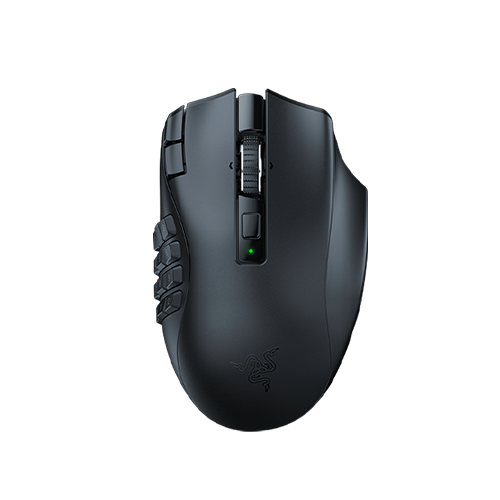
Black Razer Naga V2 HyperSpeed mouse from above, with a fixed 12-button side grid.
Fixed 12-button grid

Razer Naga V2 HyperSpeed

Choose it for a WoW or FFXIV bar that stays on twelve thumb buttons, plus two DPI stage buttons beside left click.

You give up swappable plates, a USB-C port, and the lockable ring-finger button. It runs on one AA. Razer lists 19 programmable buttons, 21 when scroll up and down are counted.

View Naga V2 HyperSpeed on Amazon
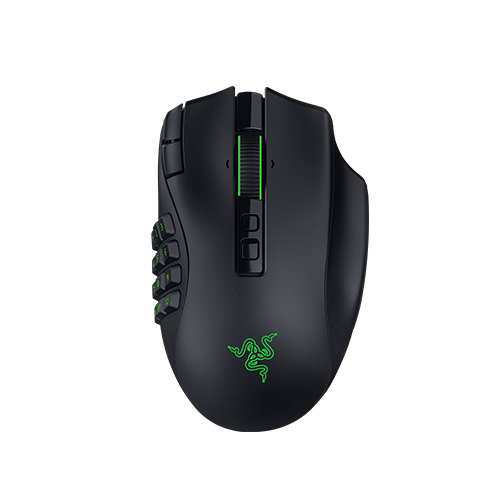
Black Razer Naga V3 Pro mouse from above, with a green logo and a 12-button side grid.
Plates, cable, ring button

Razer Naga V3 Pro

Choose it if you want to pull off the 12-button plate and snap on the 6- or 2-button plate for another game.

You also get wired USB-C and a lockable ring-finger button. The 12-button grid itself is the job the HyperSpeed already does.

View Naga V3 Pro on Amazon

Specs that change the Naga V3 Pro vs Naga V2 HyperSpeed choice

Both mice put DPI stage up and down beside left click. That pair is left out of the table. The rows below are the ones that move the purchase.

Razer Naga V3 Pro and Naga V2 HyperSpeed decision specifications
Decision pointRazer Naga V3 ProRazer Naga V2 HyperSpeedDecision
Side gridMagnetic 12-, 6-, and 2-button plates; 12 fittedFixed 12-button gridV3 Pro if you remove buttons; HyperSpeed if twelve stay put
Ring-finger buttonLockable buttonNone in the numbered layoutV3 Pro adds the button
Power2.4 GHz, Bluetooth, wired USB-C2.4 GHz and Bluetooth; one AA; no USB portV3 Pro for a cable; HyperSpeed for an AA swap
Rated batteryUp to 150 h on 2.4 GHz, 300 h on BluetoothUp to 250 h on 2.4 GHz, 400 h on BluetoothHyperSpeed has the higher published maximums
Sensor and switches50,000 DPI, 930 IPS, 90 G; Gen-4 optical, 100 million clicksFocus Pro 30K, 750 IPS, 50 G; Gen-2 mechanical, 60 million clicksHigher listed figures on the V3 Pro
Listed weightAbout 117 g, excluding cable and dongle95 g without the AA; about 118 g with the included alkaline AAClose once the AA is installed
Scroll wheel24/48-step tactile, free-spin, Smart-ReelFree-spin or tactile, with left and right tiltDifferent modes; no single winner

Battery figures are Razer’s rated maximums. The 95 g HyperSpeed figure is the one already used on this site; TechPowerUp measured about 118 g with the included alkaline AA. Razer’s V3 weight pages vary on whether the plate is included, so the 117 g figure stays approximate. HyperSpeed sensor, IPS, acceleration, and click rating are from Razer’s at-a-glance support page.

What the V3 Pro adds to the HyperSpeed grid

The WoW gear guide already starts on the HyperSpeed. The V3 Pro is the step up when the fixed grid is no longer the whole job.

Twelve thumb buttons, or a plate you can pull off

Both mice can hold a 12-button WoW or FFXIV bar. The HyperSpeed molds that grid into the shell. The V3 Pro ships with the 12-button plate fitted and includes magnetic 6- and 2-button plates. If every session stays on twelve thumb buttons, the extra plates stay in the box. Map the grid from the WoW setup hub or the WoW mouse setup guide.

A cable on the V3, an AA in the HyperSpeed

The HyperSpeed runs on one replaceable AA, and Razer does not list a USB port. The V3 Pro adds wired USB-C, so it can keep working while it charges. The hour ratings in the table are maximums, and the HyperSpeed estimate assumes the AA Razer names.

The ring-finger button is the extra key

Both mice put DPI stage up and down beside left click. HyperSpeed still lists HyperShift as a second layer on a button you press, and its numbered layout has no ring-finger button. The V3 Pro adds that button with a physical lock. Check in Synapse what it can send before you bind a cooldown to it.

Sensor listings and the weight with an AA installed

The V3 Pro’s higher DPI and click ratings sit in the table next to the HyperSpeed’s Focus Pro 30K sensor and Gen-2 mechanical switches. TechPowerUp records that same HyperSpeed sensor and switch generation. On the scale, 95 g is the HyperSpeed without the AA, and TechPowerUp measured about 118 g with the included alkaline AA, beside the V3’s about 117 g.

Is the Naga V3 Pro worth it over the Naga V2 HyperSpeed?

Worth it when you will use the plates, the cable, or the ring button. The HyperSpeed wins when the fixed grid is the layout you came for.

A 12-button WoW or FFXIV bar

Razer Naga V2 HyperSpeed

Keep the HyperSpeed when the action bar lives on the fixed grid and the two buttons beside left click can hold a modifier or a DPI step. You swap an AA instead of hunting a cable.

Longer published runtime

Razer Naga V2 HyperSpeed

Razer’s higher published maximums are on the HyperSpeed. Keep a spare AA if a swap would land during a raid.

More than one genre on one mouse

Razer Naga V3 Pro

Buy the V3 Pro when you want the 12-button plate for WoW and the 6- or 2-button plate for something else. The HyperSpeed cannot change that side wall.

A cable, or the ring-finger lock

Razer Naga V3 Pro

Buy the V3 Pro when the mouse has to run on USB-C while it charges, or when you want the lockable ring-finger button the HyperSpeed layout does not list.

What neither one fixes

Neither mouse fills in your WoW keybinds. Synapse still has to send each side button to a key, and the game still has to bind that key to a slot. The rated battery hours are maximums, not a promise for a raid night.

Neither mouse slides a 12-button panel along the shell. If the top or bottom row sits outside a comfortable thumb reach, the small-hand WoW mouse guide and the HyperSpeed vs Scimitar comparison are the next stop. The V3’s 6- and 2-button plates remove keys. They do not move the twelve.

On a Mac, Razer says the V3 Pro is not supported in Synapse. The HyperSpeed can use its default number row, and the Mac MMO mouse guide says further remapping needs a Windows PC or a supported macOS utility.

Questions about the Naga V3 Pro and Naga V2 HyperSpeed

Is the Naga V3 Pro worth it over the Naga V2 HyperSpeed?

Buy the V3 Pro for magnetic 12-, 6-, and 2-button plates, a USB-C cable, or the lockable ring-finger button. A WoW or FFXIV bar that stays on twelve thumb buttons already fits the Naga V2 HyperSpeed, which keeps that grid, DPI stage buttons beside left click, and a replaceable AA.

Do both mice keep a 12-button thumb grid?

Yes. The Naga V2 HyperSpeed has one fixed 12-button grid. The Naga V3 Pro ships with a 12-button magnetic plate and also includes 6- and 2-button plates. A bar that uses all twelve thumb buttons can sit on either mouse. The V3 is the mouse you can change by pulling the plate off.

Can the Naga V2 HyperSpeed charge or play over a cable?

No. Razer lists 2.4 GHz HyperSpeed wireless and Bluetooth for the Naga V2 HyperSpeed, and the mouse runs on one AA. The Naga V3 Pro adds wired USB-C to those two wireless modes. Rated maximums are 250 hours on 2.4 GHz and 400 on Bluetooth for the HyperSpeed, and 150 and 300 hours for the V3.

Which mouse has the DPI buttons beside left click?

Both. Razer’s HyperSpeed layout labels two buttons beside left click as DPI stage up and down. The V3 Pro product page describes two buttons beside left click for that same DPI-stage change, and adds a lockable ring-finger button. The DPI pair is shared. The ring-finger button is the V3 control.

How do the weights compare once the HyperSpeed battery is installed?

The figure this site uses for the HyperSpeed is 95 g without the AA. TechPowerUp measured about 118 g with the included alkaline AA. The V3 Pro is listed at about 117 g, excluding the cable and dongle, and Razer’s pages vary on whether the plate is included. With an alkaline AA installed, those two figures sit together.

Last checked