MMO mice · WoW, FFXIV and PoE 2

Razer Naga V3 Pro vs Razer Naga V2 Pro

The V3 Pro adds a lockable ring-finger button and separate DPI-stage controls. The V2 Pro keeps the same plate sizes, connections, and battery estimates.

Which Naga Pro should you choose?

Choose the Razer Naga V3 Pro if you want a lockable ring-finger button and separate DPI-stage controls. Choose the Razer Naga V2 Pro if its three side-plate options, USB-C, wireless modes, and listed battery estimates cover your setup. For this choice, the V3's added controls matter more than its newer sensor and switches.

AssessmentManufacturer specifications
Decision pointAdded controls versus the layouts you already use

Choose by control placement

The V3 changes the controls near your ring finger and mouse edge.

We don't run ads but we do have affiliate links for some products. As an Amazon Associate I earn from qualifying purchases.

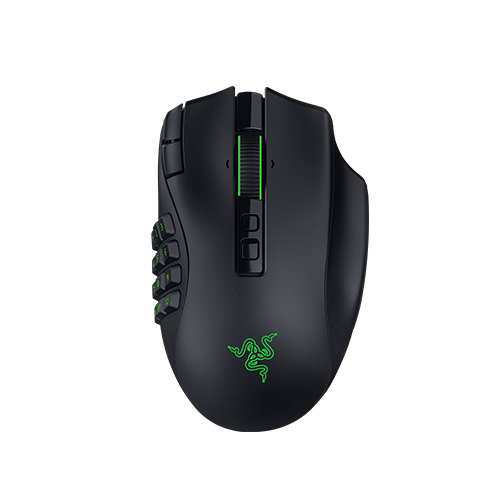
Razer Naga V3 Pro gaming mouse with its side controls visible.
Added ring and edge controls

Razer Naga V3 Pro

Choose it if: you want a lockable ring-finger button and DPI stage up/down at the edge.

Tradeoff: same plate options and battery estimates as the V2 Pro, so the gain is the extra controls.

It includes the 12-button plate plus magnetic 6- and 2-button options. Razer labels the edge pair for DPI stage changes.

View Razer Naga V3 Pro on Amazon
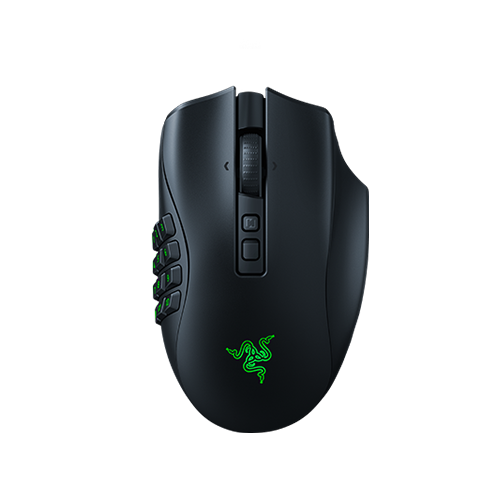
Razer Naga V2 Pro gaming mouse with its side controls visible.
Shared plate and power options

Razer Naga V2 Pro

Choose it if: its side buttons and control positions cover what you need.

Tradeoff: no lockable ring-finger button or separate DPI edge pair.

It shares the V3's three plate sizes, USB-C, wireless modes and battery maximums. Its layout lists a DPI cycle and scroll-mode button.

View Razer Naga V2 Pro on Amazon

Specs that change or preserve the choice

The shared plate, connection and battery rows are ties. Other rows show the V3's added controls and newer listed components.

Razer Naga V3 Pro and Naga V2 Pro decision specifications
Decision pointRazer Naga V3 ProRazer Naga V2 ProDecision / winner
Side plates12-, 6- and 2-button magnetic plates; 12 fitted12-, 6- and 2-button platesTie on plate choices
Ring-finger buttonLockable button and toggleNone listedV3 Pro adds the position
Edge DPI controlsTwo buttons: stage up/downDPI cycle; no edge pair listedV3 Pro adds separate controls
Sensor and switches50,000 DPI, 930 IPS, 90 G; Gen-4, rated 100 million clicks30,000 DPI, 750 IPS, 70 G; Gen-3, rated 90 million clicksHigher listed figures: V3 Pro
Listed weightAbout 117 g, excluding cable/dongleAbout 134 g, excluding cable/dongleV3 listed lower; plate accounting varies
Scroll wheel24/48-step tactile, free-spin, Smart-Reel4-way mechanical, 6 modesDifferent modes; no clear winner
Connections2.4 GHz, Bluetooth, wired USB-C2.4 GHz, Bluetooth, wired USB-CTie
Maximum battery estimateUp to 150 h (2.4 GHz), 300 h (Bluetooth)Up to 150 h (2.4 GHz), 300 h (Bluetooth)Tie on Razer's figures

Razer lists the same three plate sizes for both mice. Check with Razer before using a V2 Pro plate on the V3 Pro. Razer's weight figures vary on plate inclusion, so compare the published figures as listed.

Control placement separates the Naga V3 Pro and Naga V2 Pro

The V3 Pro adds a ring-finger button and a separate pair of DPI controls; Razer lists no matching positions on the V2 Pro.

The V3 adds ring-finger and DPI controls

Razer lists a lockable ring-finger button and separate edge buttons for DPI stage up and down. The V2 Pro has a DPI cycle button, but no ring-finger button or edge DPI pair in its layout. If you want to assign the ring button to an MMO action, check its available options in Synapse; Razer labels the edge pair for DPI stage changes. For background, see our G600 replacement guide.

The thumb grid stays the same

Both mice offer 12-, 6- and 2-button plates; the V3 ships with 12 fitted. That is a tie for WoW or FFXIV action bars built around the 12-button grid. Compare the other controls using our WoW setup hub, FFXIV setup hub and FFXIV mouse guide.

In PoE 2, either mouse can use the smaller plates. Razer labels the V3's edge buttons for DPI stage changes. If you want to use them for flask actions, check in Synapse whether they can be remapped. See our Path of Exile hub and PoE 2 input guide.

Weight listings are not directly precise

Razer lists about 117 g for the V3 and 134 g for the V2, excluding cable and dongle. Its pages vary on whether plate weight is included, so avoid calculating an exact saving. Dimensions are 118.8 x 75.5 x 43.5 mm for the V3 and 119.5 x 75.5 x 43.5 mm for the V2, nearly the same stated footprint.

The newer components do not settle an MMO choice

The V3 lists a Focus Pro 50K Gen-3 sensor and Gen-4 optical switches; V2 lists Focus Pro 30K and Gen-3 switches. The higher figures and click ratings do not establish a gameplay or lifespan difference.

The wheel modes differ too: V3 lists tactile steps, free-spin and Smart-Reel; V2 lists four-way mechanical input and six modes. Razer's support FAQ says the V3 is not supported in Synapse for Mac. Razer lists Synapse 3 for V2; Mac users should check Razer's current support guidance before choosing it. Razer also lists AI Prompt Master and Frame Sync for V3; neither changes this control comparison.

When to choose each Naga model

The V3 Pro adds the ring-finger button and separate DPI pair; the V2 Pro has four-way mechanical scrolling with six modes.

A ring-finger button

Razer Naga V3 Pro

Choose V3 if you want the lockable ring-finger button that the V2 Pro's listed layout lacks.

Separate DPI stage buttons

Razer Naga V3 Pro

Choose V3 if you want edge buttons specifically labeled for DPI stage up and down. V2 lists a DPI cycle button, not that separate pair.

A 12-button thumb grid

Razer Naga V2 Pro

If the 12-button plate already covers your MMO layout, V2 offers the same listed plate choice without the V3's extra ring-finger or edge DPI controls.

Four-way mechanical scrolling

Razer Naga V2 Pro

Choose V2 if its four-way mechanical wheel and six modes match your preference. V3 has different tactile, free-spin and Smart-Reel modes.

What neither one fixes

Battery figures are Razer's rated maximums: up to 150 hours on 2.4 GHz and 300 hours on Bluetooth for either mouse. Ask Razer whether the plates fit both models before buying extras. If you want to assign the V3's ring button to a specific MMO action, check its options in Synapse; the edge buttons are listed for DPI stage changes.

Questions about the Naga V3 Pro and Naga V2 Pro

Is the Naga V3 Pro a major upgrade over the Naga V2 Pro?

The V3 Pro adds a lockable ring-finger button and two edge controls for DPI stage up and down. Both mice keep the same 12-, 6- and 2-button side plates, USB-C, 2.4 GHz and Bluetooth connections, and Razer-rated battery maximums. The upgrade matters most if those added positions match your setup.

Do the Naga V2 Pro side plates fit the Naga V3 Pro?

Razer lists 12-, 6- and 2-button plates for both mice but does not describe them as interchangeable. Check with Razer before using a V2 Pro plate on a V3 Pro. The V3 Pro ships with its 12-button plate installed.

Does the Naga V3 Pro have longer battery life?

Razer rates both models for up to 150 hours on 2.4 GHz and up to 300 hours over Bluetooth. Battery figures are Razer's rated maximums, so compare the published figures as estimates. They tie on battery claims and do not separate the mice.

Does the Naga V3 Pro work with Razer Synapse on Mac?

Razer's support FAQ says the Naga V3 Pro is not supported in Razer Synapse for Mac. Razer lists the Naga V2 Pro as Synapse 3-enabled. If you use a Mac, check Razer's current compatibility guidance for the V2 Pro before choosing it.

Last checked