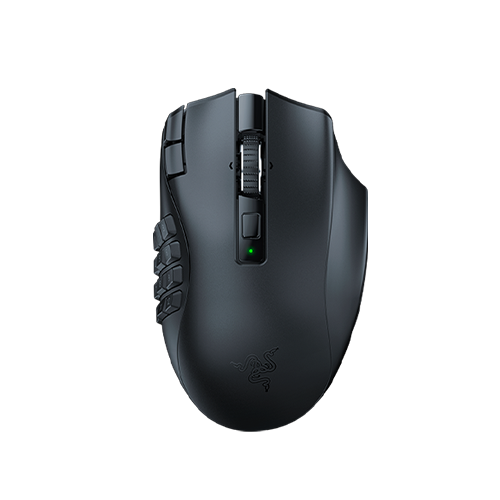
Razer Naga V2 HyperSpeed
Choose it if: you want a full side grid for MMO action bars and other binds you prefer to keep on the mouse.
Tradeoff: the 12-button panel is fixed, and the mouse uses a replaceable AA.
Razer Naga V2 HyperSpeedMMO and ARPG mice · WoW, FFXIV, OSRS and Albion
The Naga V2 HyperSpeed gives your thumb a fixed 12-button grid. The G502 X Plus keeps an open, rubberized thumb rest and a smaller set of side and index controls, with LIGHTSPEED wireless.
Choose the Naga V2 HyperSpeed if you want a 12-button thumb grid for MMO action bars. Choose the G502 X Plus if an open thumb rest and a smaller button map fit your binds better.
The Razer Naga V2 HyperSpeed has 19 programmable buttons, including a 12-button thumb grid. Logitech lists 13 programmable controls on the G502 X Plus, which leaves the thumb area open.
As an Amazon Associate, MMOSetup earns from qualifying purchases.

Choose it if: you want a full side grid for MMO action bars and other binds you prefer to keep on the mouse.
Tradeoff: the 12-button panel is fixed, and the mouse uses a replaceable AA.
Razer Naga V2 HyperSpeed
Choose it if: your binds fit a smaller mouse map and you prefer an open thumb rest with LIGHTSPEED wireless.
Tradeoff: it has no 12-button thumb grid and uses a built-in rechargeable battery.
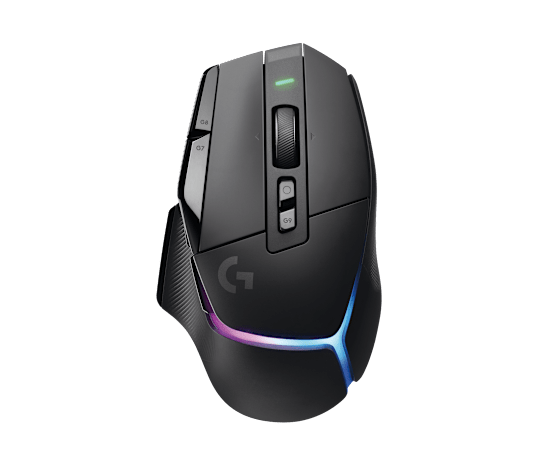
Logitech G502 X PlusThe G502's open thumb rest and smaller button map suit a different layout than the Naga's full side grid.
| Decision point | Razer Naga V2 HyperSpeed | Logitech G502 X Plus | Decision |
|---|---|---|---|
| Programmable controls | 19 buttons; 21 programmable controls including scroll up/down | 13 programmable controls | Naga provides more programmable controls; Logitech leaves a larger thumb rest. |
| Thumb-side layout | Fixed 12-button panel | Open rubberized thumb rest, two side buttons and reversible DPI-shift paddle | G502 leaves room to hold the shell. |
| Scroll wheel | Left/right tilt and free-spin/tactile modes | Left/right tilt and dual-mode scrolling | Both provide wheel tilt. |
| Main switches | Razer Gen-2 mechanical | LIGHTFORCE hybrid optical-mechanical | Different switch designs. |
| Best MMO Match | World of Warcraft, Final Fantasy XIV, RuneScape 3, Guild Wars 2 | Old School RuneScape, Albion Online, Path of Exile, WoW keypad users | Choose by how many actions you want on the mouse. |
| Amazon listings | Razer Naga V2 HyperSpeed | Logitech G502 X Plus | Check each exact model. |
The Naga puts a 12-button panel where the thumb rests. Logitech leaves that area open and adds fewer controls around the thumb and index finger.
The Naga V2 HyperSpeed has a fixed 3-by-4 side grid. Its two index-edge buttons sit beside left click. That layout suits a game with a dozen actions under your thumb, but leaves little bare side surface to use as a thumb rest.
The G502 X Plus uses an open, rubberized thumb rest, two side buttons and a reversible DPI-shift paddle. It has fewer programmable controls, but the thumb can rest on the shell instead of beside a panel. The smaller button map works only if it covers your binds.
The Naga V2 HyperSpeed uses a replaceable AA. The G502 X Plus has a built-in rechargeable battery and charges over USB-C.
In a keyboard-movement setup, the G502 X Plus paddle, side buttons and wheel tilt can hold separate actions such as a flask or utility bind. Assign one input to each control through game settings or G HUB.
If a build needs twelve side actions, the Naga's grid gives you more places to bind them. If it needs only a few and you want an open thumb rest, the G502 is the direct fit.
Start with the number of actions you want on the mouse, then consider the battery tradeoff: a replaceable AA in the Naga or a built-in rechargeable battery in the G502 X Plus.
Keep a full 12-button thumb grid when your bar map uses those controls. Its index-edge buttons and wheel tilt add binds outside the side panel.
Map a Life Flask to the reversible paddle and another utility action to a side button while your left hand handles movement. The Plus gives you LIGHTSPEED wireless and a rechargeable battery.
If F-keys cover your OSRS tabs and you want only a few mouse binds, the G502 X Plus leaves the thumb area open. Our OSRS setup hub and mouse and F-key guide cover that layout.
Choose the fixed grid when twelve thumb binds are more useful than open grip area. Its control count helps only if you assign actions you use.
The G502 family does not have a 12-button side grid, so it is a poor fit if you need that many thumb binds. The Naga's full panel leaves less bare thumb-side surface. Neither mouse decides which actions a game allows or makes a keybind map easier to learn; set each button as one intended input.
It can be if your mouse binds cover the actions you want there. Logitech lists 13 programmable controls for the G502 X Plus, while the Naga V2 HyperSpeed has a 12-button thumb grid. Keep some abilities on the keyboard if that map fits your setup.
Choose the G502 X Plus if you use F-keys for OSRS tabs and want only a few actions on the mouse. Its open thumb rest, side buttons, reversible paddle and wheel controls suit that smaller map. Choose the Naga V2 HyperSpeed if you want a 12-button grid under your thumb.
LIGHTFORCE is Logitech's hybrid optical-mechanical switch design for the G502 X Plus. Logitech describes it as pairing optical actuation with a mechanical click feel.