MMO mice · WoW, FFXIV and RuneScape

Razer Naga V2 Pro vs Corsair Scimitar Elite Wireless SE: Modular Plates vs Sliding Grid

The Naga V2 Pro swaps between 12-, 6- and 2-button side plates and adds left/right wheel tilt. The Scimitar Elite Wireless SE keeps its 12-button grid and slides it up to 8 mm.

The short answer

Choose the Naga V2 Pro if you use wheel tilt for Ctrl, Alt or Razer Hypershift, or switch between a 12-button MMO layout and the 6- or 2-button plates. Choose the Scimitar SE if moving its 3-by-4 panel up to 8 mm would better fit your thumb reach. Corsair lists the Scimitar at 114 g and Razer lists the Naga at 134 g, a 20 g difference by the listed weights.

Last checked
Before orderingRecheck the exact model and listing

Pick between a modular side plate and an adjustable grid

Both are right-handed wireless MMO mice with 12-button side layouts. The Naga changes the layout; the Scimitar moves its 12-button panel.

Buying through our Amazon links costs you nothing extra and helps keep MMOSetup free. As an Amazon Associate we earn from qualifying purchases.

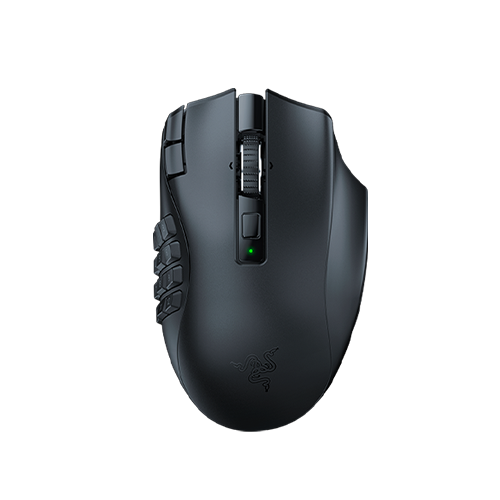
Razer Naga V2 Pro gaming mouse shown from above and the left side.
More side-panel options

Razer Naga V2 Pro

Choose it if: you switch between MMO action bars and games that need fewer thumb inputs. Its magnetic plates change the panel from 12 buttons to 6 or 2.

Tradeoff: Razer lists the Naga at 134 g, and none of its plates slide forward or back.

Razer Naga V2 Pro

Lighter 12-button alternative:
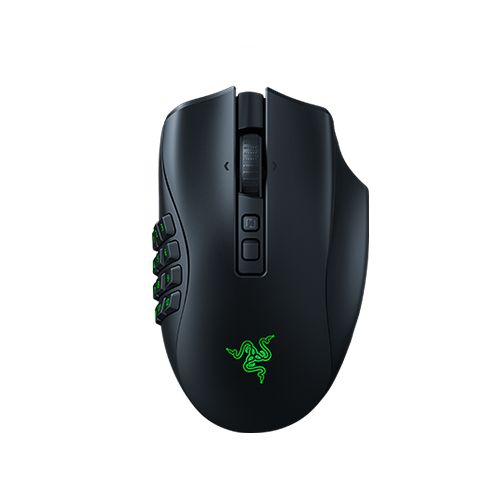
Razer Naga V2 HyperSpeed black gaming mouse, viewed from above. Razer Naga V2 HyperSpeed

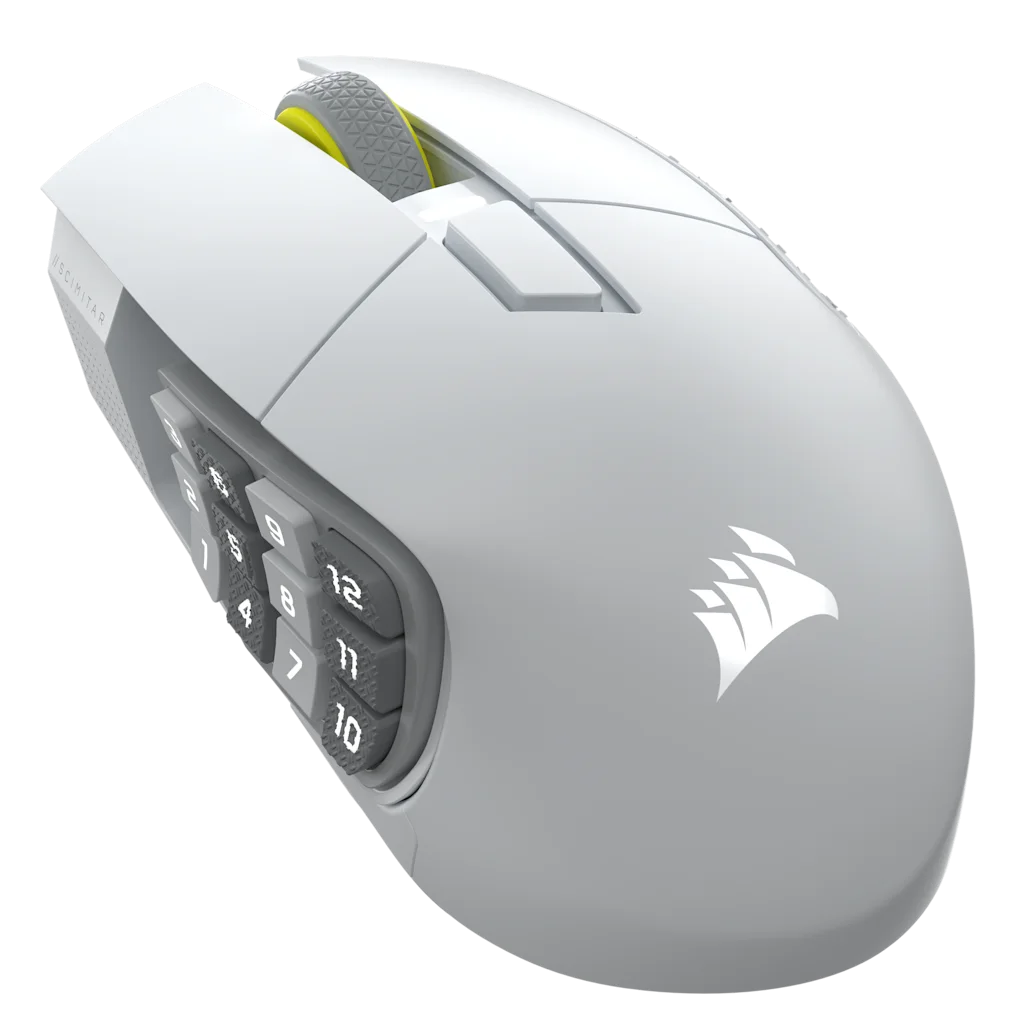
White Corsair Scimitar Elite Wireless SE mouse with its 12-button side panel visible.
Adjustable thumb position

Corsair Scimitar Elite Wireless SE

Choose it if: a fixed panel makes the first or fourth row difficult to reach. Its Key Slider moves the full 12-button panel up to 8 mm.

Tradeoff: you keep one 12-button layout and give up the Naga's wheel-tilt inputs.

Corsair Scimitar Elite Wireless SE

Specs that change the choice

DPI ceilings do not decide this matchup; the relevant differences are wheel tilt, plate count and thumb-panel position.

Razer Naga V2 Pro and Corsair Scimitar Elite Wireless SE controls, weight and connections
Decision pointRazer Naga V2 ProCorsair Scimitar Elite Wireless SEDecision
Weight134 g (manufacturer-listed weight)114 g (manufacturer-listed weight)Scimitar is 20 g lighter by the listed weights.
Side buttonsMagnetic plates: 12, 6 or 2 buttons12-button Key Slider moves up to 8 mmNaga changes count; Scimitar adjusts reach.
Programmable controlsUp to 22 programmable controls; 19 programmable buttons16 customizable buttonsThe manufacturers use different control-count labels.
Scroll wheelHyperScroll Pro with 6 modes (one customizable) and left/right tilt-clicksScroll and click; left/right tilt is not listedNaga adds two wheel directions.
Connections and batteryHyperSpeed 2.4 GHz, Bluetooth and USB-C; up to 150 h on HyperSpeed or 300 h on Bluetooth2.4 GHz, Bluetooth and USB-C; up to 150 h on 2.4 GHz or 500 h on Bluetooth with RGB offBoth list up to 150 h on 2.4 GHz; Bluetooth maximums differ.
Main switches and sensorRazer Optical Mouse Switches Gen-3; Focus Pro 30K optical sensorCorsair optical switches; MARKSMAN S 33K optical sensorBoth use optical switches; the listed sensor models differ.
Amazon listingsPrimary: Razer Naga V2 Pro; lighter 12-button alternative: Razer Naga V2 HyperSpeedCorsair Scimitar Elite Wireless SELinks go to the compared models.

The practical difference is how you place the thumb buttons

The Naga varies how many buttons sit beside your thumb. The Scimitar keeps twelve and moves their panel a short distance.

A fixed plate or an 8 mm slider

The Naga V2 Pro includes a 12-button plate for MMO bars, plus 6- and 2-button plates for a smaller thumb layout. Each plate attaches magnetically. The Scimitar SE keeps its 3-by-4 panel and slides it up to 8 mm before you lock it with the included tool.

If you already reach every row on a fixed grid, the Scimitar's adjustment may not matter. If your grip makes the top or bottom row awkward, moving all twelve buttons may be more useful than changing their count.

Wheel tilt is a separate set of binds

The Naga's wheel tilts left and right, and HyperScroll Pro lets you adjust scroll tension and mode in Synapse. Those two directions can hold modifier or utility binds if you already use wheel tilt. Corsair's specifications do not list left/right wheel tilt, so plan around its side grid and keyboard modifiers.

Weight and battery life

Razer lists the Naga at 134 g and Corsair lists the Scimitar SE at 114 g, a 20 g difference by the listed weights. Both list up to 150 hours over 2.4 GHz; their Bluetooth estimates are up to 300 hours for Razer and 500 hours for Corsair with RGB off.

These are maximum estimates with lighting off; actual battery life depends on settings and connection.

Which mouse fits each setup?

Choose by your action layout and hand position; a larger control count only helps when you have a bind for it.

WoW and FFXIV action bars

Razer Naga V2 Pro or Corsair Scimitar SE

WoW and FFXIV: Choose the Naga V2 Pro if you bind 24 or more abilities across two bars and use left wheel tilt for Ctrl or Hypershift. Choose the Scimitar SE if you already hold Shift or Ctrl on your keyboard or foot pedal and want to slide the 12-button panel to your thumb.

Reach is the sticking point

Corsair Scimitar Elite Wireless SE

The first or last row falls outside your natural thumb movement. Slide the panel, lock it, then set up the same twelve binds in iCUE.

Wheel-tilt modifiers

Razer Naga V2 Pro

You already use left/right tilt for Ctrl, Alt or a second action layer. The two tilt directions keep those inputs on the mouse.

RuneScape 3 action binds

Razer Naga V2 Pro or Scimitar SE

RuneScape 3: Choose the Naga V2 Pro if wheel tilt holds Target Cycle or Dive / Bladed Dive while its side buttons handle prayers, food, or brews. Choose the Scimitar SE if you keep those binds on a keyboard or foot pedal and want to reposition its 12-button panel.

What neither one fixes

Neither mouse moves game actions off your keyboard automatically. You still configure binds in Synapse or iCUE and confirm that the layout works with the game's own keybind options. Both shells are right-handed and relatively large; if you need a compact or left-handed shape, this comparison does not answer that purchase question.

Questions about the Razer Naga V2 Pro and Corsair Scimitar Elite Wireless SE

Do the magnetic side plates on the Razer Naga V2 Pro wobble during gameplay?

Razer lists three magnetic plates with 12-, 6- and 2-button layouts, but its published specs do not answer whether they wobble during use. They confirm the plates attach magnetically, not that they remain completely still under thumb presses. If that distinction matters, check a store display or contact Razer before deciding.

Is the Naga V2 Pro lighter than the Scimitar SE?

The Scimitar is lighter by the manufacturers' listed weights: Corsair lists it at 114 g, while Razer lists the Naga V2 Pro at 134 g, a 20 g difference. These are published specifications rather than measurements made for this comparison, so use them as a side-by-side reference, not a claim about every unit's exact weight.

Does the Scimitar SE have scroll-wheel tilt?

Corsair's Scimitar SE specifications list the wheel and its click but not left/right tilt. The Naga V2 Pro has left and right tilt inputs as part of HyperScroll Pro. If wheel tilt is part of your keybind map, keep that difference in mind before moving binds.

Can I use the Naga's smaller side plates in an MMO?

Yes. The Naga V2 Pro includes 12-, 6- and 2-button plates. You can map each active plate in Synapse. The smaller plate trades access to some thumb buttons for a more open side layout; it does not change the mouse's other top and wheel controls.

If I only use a 12-button grid, how does the Naga V2 Pro compare with the Scimitar SE?

The Naga V2 Pro has left and right wheel tilt and comes with 12-, 6- and 2-button plates. The Scimitar SE keeps 12 buttons and slides the panel up to 8 mm. For another fixed 12-button mouse, consider the separate Razer Naga V2 HyperSpeed model.

MMOSetup interactive tool

Visual MMO Mouse Keybind Explorer

Choose a game, role, and physical layout. Then tune the binds to match how your hand actually rests.

MMOSetup is free and has no ads. If you buy through our Amazon links, you pay the same price and we earn a small cut, which keeps the guides coming. As an Amazon Associate we earn from qualifying purchases.

Help me choose a mouse

Compare layouts that match your preferences. If your current mouse already covers your bindings, you can keep using it.

1. Pick a game
Role preset
2. Pick a mouse

Physical map

Mouse layout

Select a control below, or enlarge the map to use its numbered markers.

01 · Thumb 11Primary rotation
02 · Thumb 22Secondary rotation
03 · Thumb 33Area action
04 · Thumb 44Interrupt★ home row
05 · Thumb 55Defensive★ home row
06 · Thumb 66Mobility★ home row
07 · Thumb 77Utility
08 · Thumb 88Target swap
09 · Thumb 99Cooldown
10 · Thumb 100Potion
11 · Thumb 11-Mount / travel
12 · Thumb 12=Extra utility
13 · Left clickMouse 1Left click
14 · Right clickMouse 2Right click
15 · Wheel clickMouse 3Wheel click
16 · Tilt leftF1Interrupt
17 · Tilt rightF2Secondary rotation
18 · Index edge 1F3Area action
19 · Index edge 2F4Interrupt

Last checked