Best MMO mouse for WoW? The grid your thumb can find without looking.
There is no single best MMO mouse for World of Warcraft. Start with the actions you will put under your thumb. Keep a standard mouse if your keyboard map already works. Choose a fixed 12-button grid such as the Razer Naga V2 HyperSpeed when every row is reachable without looking. Choose the Corsair Scimitar Elite Wireless SE when the side panel must slide to your thumb. Choose the Razer Naga V3 Pro only when magnetic 12/6/2 plates and a lockable ring-finger button are the reason to buy.
The best MMO mouse for WoW is the side grid your thumb can learn for the binds you already named. Keep a normal mouse plus keyboard modifiers when movement and action bars already feel predictable. Choose the Naga V2 HyperSpeed when a smaller fixed 12-button grid is reachable without looking. Choose the Scimitar Elite Wireless SE when that grid has to slide to your thumb. Choose the Naga V3 Pro only for magnetic 12/6/2 plates and a lockable ring-finger button. Hand size and software stack reverse the shortlist more often than sensor marketing. Skip a new mouse when your keyboard map already works.
Layout comes before SKU. If your keyboard map already works, a new mouse adds learning cost without solving a named problem.
WoW MMO mouse layout decision
Path
Fits when
Put on the mouse
Tradeoff
Keyboard + 2 to 6 side buttons
Movement, modifiers, and a few utilities already feel natural.
Interrupt, utility, targeting, or one repeatable defensive.
Less mouse-side capacity; more keyboard discipline.
Fixed 12-button grid
You can reach every row without looking and will map the grid on purpose.
Role utility, cooldowns, targeting layers, or mirrored bar groups.
Thumb reach and learning cost matter more than the feature list.
Adjustable 12-button grid
A fixed grid is close, but the panel needs to slide to your thumb.
The same dense action map, after moving the Key Slider to fit.
Typically larger and heavier; the slider solves a specific fit problem.
Swappable 12/6/2 plates
You want one mouse that changes grid density, or you want the lockable ring-finger button.
The same named actions, then a thinner plate when the full grid is unused.
Larger rechargeable body. Not a compact fixed-grid replacement and not a Key Slider.
The bottleneck
The bottleneck is a reachable grid for YOUR binds.
Write down the actions that should live under the thumb before you shop. Interrupt, defensive, target, and one repeatable utility are enough to start. If you cannot name those binds, you do not have a 12-button problem yet.
Extra buttons help only when they are already assigned and findable without looking. A denser grid that forces a palm shift during movement is not more capacity. It is a second search problem.
The physical map belongs here. The bind philosophy belongs on the WoW keybind setup by role. Use that page to place movement, modifiers, and role tools, then come back if a thumb grid still has a job.
Budget, wireless use, and six-versus-12 change the shortlist. They do not change the reach rule.
Budget
Spend on reach, not a feature list.
Under $50 can make sense when a wired or heavier mouse is acceptable. Under $100 opens more wireless and software options. Treat those bands as shopping windows, not permanent prices. A cheaper grid you can find by feel beats a denser grid you hunt for.
Wireless
Buy cable freedom, not a speed promise.
2.4 GHz wireless is the practical WoW path. Bluetooth is useful for a laptop or second device. Neither connection makes a missed interrupt land. Cable freedom is the honest win. Sensor adjectives are not.
Six vs 12
Use the smaller grid when it is enough.
A six-button mouse plus Shift or Ctrl can cover a lot of WoW layouts. A 12-button grid earns its space when the extra actions are already assigned and easy to find. Layers are cheaper than a second row you cannot reach.
No MMO mouse
Keep the normal mouse if it works.
WoW does not require an MMO mouse. If movement, modifiers, and action bars already feel predictable, a new mouse adds cost and learning time without solving a real problem. That is a first-class recommendation, not a consolation prize.
Reuse one physical map across characters. Change labels, not thumb geography.
DPS / solo
Keep the rotation stable.
Leave the cast or swing loop on keys your fingers already trust. Use the mouse for repeatable utility and cooldowns only when it removes a real keyboard conflict. Empty buttons are not a reason to move the rotation.
Healer
Protect targeting clarity.
Mouse-side inputs help when they hold utility or a modifier layer without hiding your frames. A button grid cannot replace a readable HUD. If targeting gets worse after the move, put those binds back on the keyboard.
Tank / melee
Leave movement dependable.
Keep strafe, camera, and the defensive you press while moving where the hand returns naturally. A dense grid is useful only when the lower row does not steal that return path.
Multi-character
Reuse the shell.
Keep the same physical position for interrupts, movement, and major defensives. Let only the ability labels change between characters. A new class is not a reason to learn a new thumb map.
Hand fit
Hand size can reverse the shortlist.
Measure from the wrist crease to the tip of the middle finger, then check whether your thumb can press the lower row without shifting your palm. If the bottom buttons need a grip change, a fixed 12-button grid is the wrong default even when the spec sheet looks right. Slide the panel, step down to six buttons plus modifiers, or keep a normal mouse.
That reach question owns the product fork more often than wireless mode or plate marketing. The full measure steps and path table live on the WoW MMO mouse guide for small hands. This page stays on the layout decision.
These cards cover the three named hardware paths after the layout fork. Recheck the selected Amazon configuration before ordering. Manufacturer pages are the spec source; Amazon is the checkout path when the listing matches.
As an Amazon Associate we earn from qualifying purchases.
Fixed full grid
Razer Naga V2 HyperSpeed
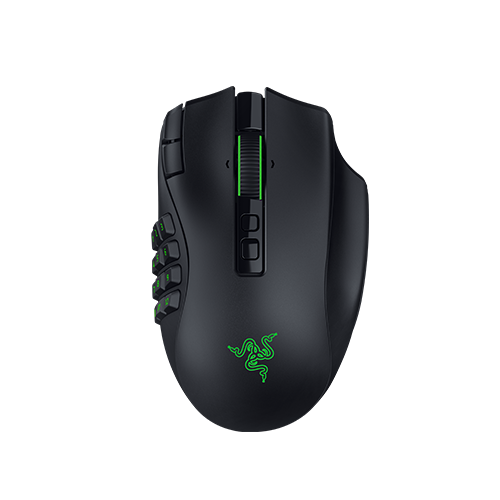
The Naga V2 HyperSpeed fits when you want a smaller fixed 12-button side grid and 19 programmable buttons on an AA-powered wireless body. Razer lists HyperSpeed Wireless plus Bluetooth, and remapping through Synapse.
Tradeoff: the grid does not move. Razer lists up to 400 hours in Bluetooth mode and up to 250 hours in HyperSpeed mode with an AA cell. Keep this over the Naga V3 Pro when you only need that compact fixed 12-button job. Skip to V3 Pro if magnetic 12/6/2 plates and a lockable ring-finger button are the purchase reason.
Exact record: black wireless model, ASIN B0BGJT87N2. Verify that configuration on the listing before checkout.
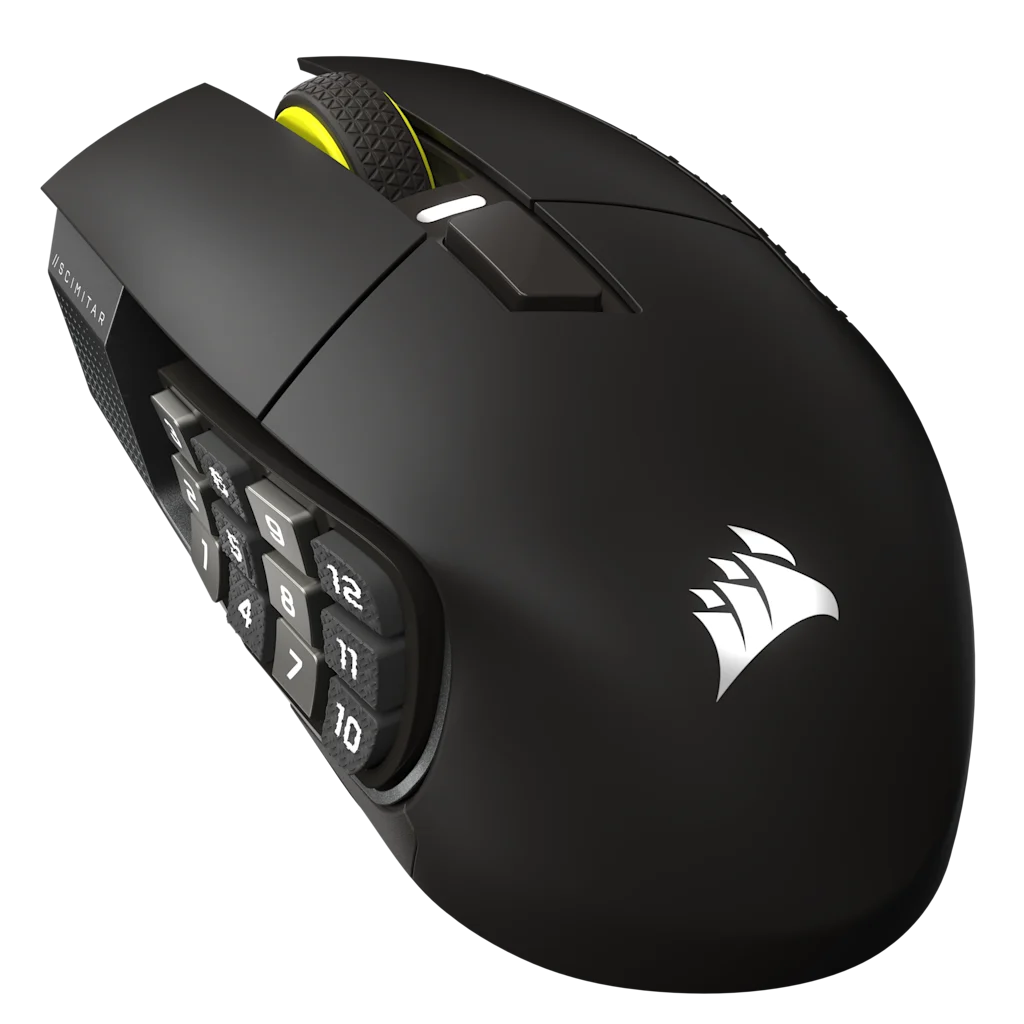
The Scimitar Elite Wireless SE fits when the 12-button side panel needs to slide to your thumb. Corsair's Key Slider is the job. The body is the larger, heavier Wireless SE in Gunmetal, not an older wired Scimitar.
Tradeoff: Corsair lists 114 g and a 119.23 × 73.48 × 42.17 mm shell. Remapping lives in iCUE, with Elgato Stream Deck mapping as a software extra. That stack is a reason to stay in Corsair. It is not a reason to pick this mouse if a fixed Naga grid already fits.
Exact record: Gunmetal MPN CH-9314014-WW, ASIN B0F6NGCDFN. Confirm Wireless SE, not a classic wired Scimitar, before checkout.
The Naga V3 Pro fits when you want magnetic 12-, 6-, and 2-button plates and a lockable ring-finger button on one rechargeable mouse. That is a different job from HyperSpeed's smaller fixed grid and from the Scimitar Key Slider.
Tradeoff: larger and heavier than HyperSpeed. Razer lists 117 g with the preinstalled 12-button plate, USB-C charging, HyperSpeed or Bluetooth, and Synapse 4. It does not replace HyperSpeed when you only need a compact fixed 12-button grid. It does not replace the Scimitar when sliding the panel to your thumb is the fit problem.
Exact record: wireless swappable-plate model, ASIN B0H4SBT4SH. Verify that Amazon configuration. If the listing is not the V3 Pro with plates, use the Razer product page instead.
Build around the current UI, not an old addon promise.
Blizzard documents Edit Mode in the Game Menu. You can move action bars, frames, and other HUD pieces, then save a layout per spec. Use that current bar and frame layout as the baseline, then place the physical controls around it.
Addon and combat-information behavior can change with patches. Date any addon-dependent instruction and recheck it before you trust an old screenshot. The mouse map should follow the HUD you can see today.
Before you compare sensor names, mark the side-button rows on a spare mouse or use the return policy on the exact model. Test the actions that matter to your role, not a generic 1 through 12 count.
Find the center, top, and bottom side buttons without looking.
Press an interrupt, defensive, and target action in sequence.
Move the mouse and return your thumb to the same row.
Try the same map for a long enough session to expose grip changes.
Keep a smaller grid or keyboard-led path if the thumb starts searching.
Compare
Compare exact models after you pick the job.
The layout decision stays on this page. These comparisons settle two exact models. They do not replace the fork above.
Reviewed on Sep 4, 2026 against the Razer and Corsair product pages for the named grids, plates, battery bands, weights, and software stacks, plus Blizzard's Edit Mode note. Amazon titles for the three ASINs were confirmed from public listing records. In-cart stock was not verified here.
Mouse fit was not verified in a live session. Sensor feel, click latency, price, and stock stay out of scope. Manufacturer battery hours are cited as listed, not measured.
No. A normal mouse plus keyboard modifiers is a valid setup when movement and action bars already feel predictable. A denser grid only helps after those extra actions are assigned and findable.
Is six buttons enough?
Often. Use the reachable buttons for repeatable utility and layer the rest with Shift or Ctrl. Add a full 12-button grid only when those extra actions are assigned and findable without looking.
Is wireless worth it for WoW?
It can be if cable freedom matters. That is the honest win. It is not a speed upgrade by itself. Choose 2.4 GHz for the desk, Bluetooth for a laptop, then verify battery and software on the exact model.
Which mouse for small hands?
There is no universal winner. Start with lower-row reach, then compare a fixed grid with a sliding panel. The measure steps live on the small-hand WoW MMO mouse guide.
Is the Naga or Scimitar better?
The Naga path is a fixed side grid. The Scimitar path is an adjustable Key Slider. Thumb fit reverses the decision; button count alone does not. Compare the exact wireless models on the Naga V2 HyperSpeed versus Scimitar Elite Wireless SE page after you know which job you need.