
MMO mice · WoW action bars

Razer Naga V2 HyperSpeed vs Corsair Scimitar Elite Wireless SE: 12-Button MMO Mouse Comparison

For WoW, thumb reach decides: the Scimitar's Key Slider moves its 12-button panel 8 mm; the Naga's grid is fixed.

The short answer

For WoW, choose the Corsair Scimitar Elite Wireless SE if a fixed thumb grid leaves its top or bottom row out of reach. Choose the Razer Naga V2 HyperSpeed if the fixed grid fits and you want two extra top buttons, a tilt wheel, and AA swaps instead of charging.

Last checked
Before orderingRecheck the exact model and listing

Choose for controls, battery, or thumb fit

The Naga has 19 programmable buttons (21 with scroll up/down) and an AA battery. The Scimitar's Key Slider adjusts its 12-button panel, and its main switches are optical.

Buying through our Amazon links costs you nothing extra and helps keep MMOSetup free. As an Amazon Associate we earn from qualifying purchases.

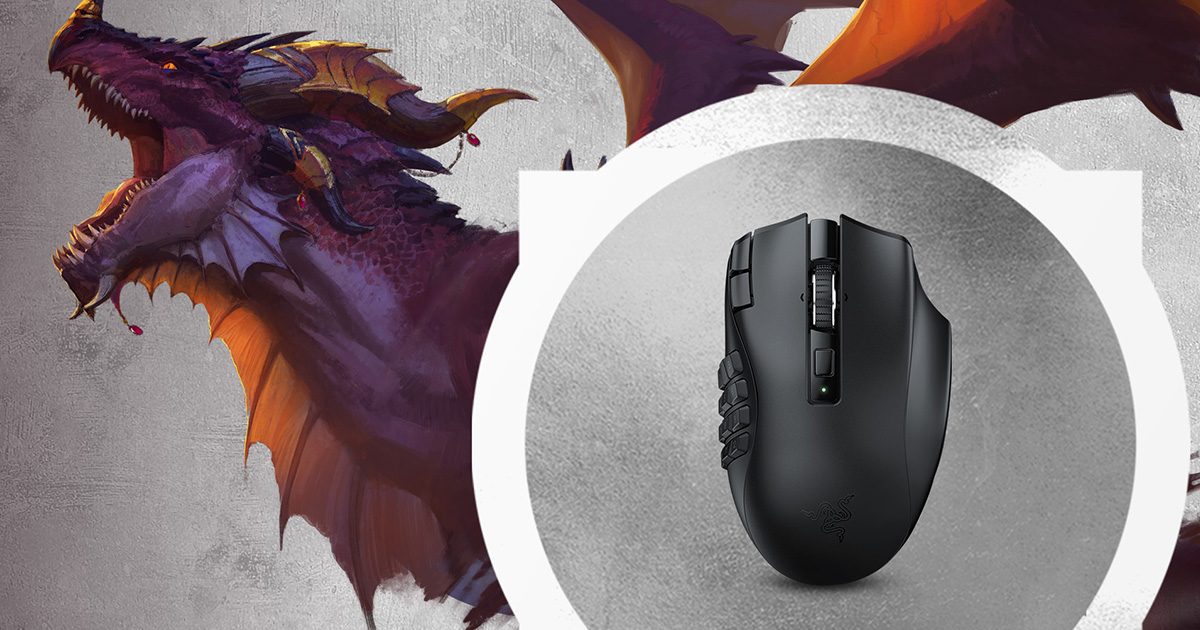
Black Razer Naga V2 HyperSpeed wireless MMO gaming mouse
Total controls and battery life

Razer Naga V2 HyperSpeed (Black)

Choose it if: the fixed grid fits and you want 19 programmable buttons (21 with scroll up/down) plus up to 250 hours on 2.4 GHz from one AA.

Tradeoff: the 12-button grid cannot slide to meet your thumb, and the mouse has no USB-C charging.

Razer Naga V2 HyperSpeed (Black)

Rechargeable three-plate sibling: Razer Naga V2 Pro (Black).
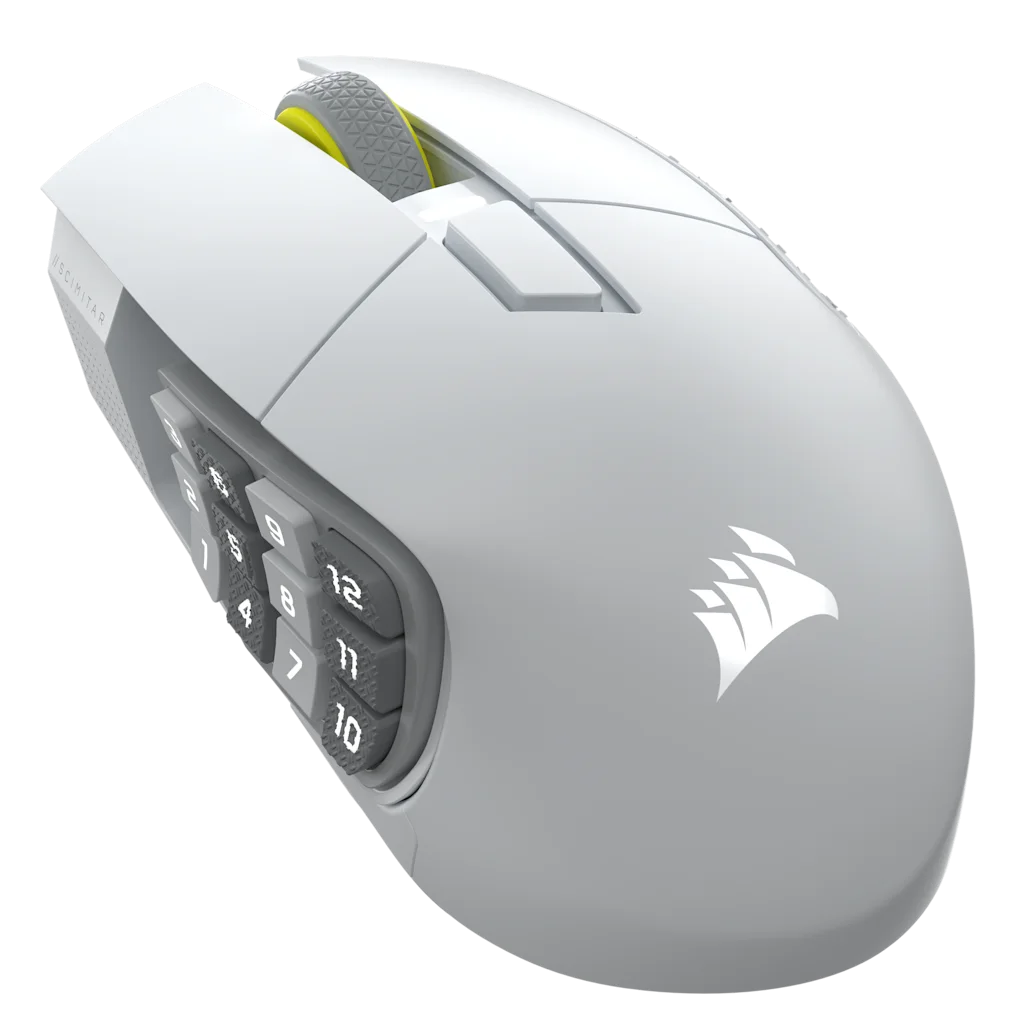
White Corsair Scimitar Elite Wireless SE gaming mouse
Custom thumb fit and optical clicks

Corsair Scimitar Elite Wireless SE (White)

Choose it if: the fixed grid leaves buttons outside your comfortable reach. Its Key Slider moves the panel 8 mm, and its main switches are optical. See the WoW MMO mouse for small hands guide if reach is the deciding factor.

Tradeoff: 16 programmable buttons to the Naga's 19, and remapping runs through iCUE.

Corsair Scimitar Elite Wireless SE (White)

Which one for WoW, FFXIV, or OSRS?

WoW

The 12 side buttons map directly to WoW Action Bar 1: keys 1 through 0, minus, and equals; the Scimitar ships with that map, and you can assign it to the Naga in Synapse. Place your rotation on the row your thumb rests on, then put cooldowns and defensives on rows reached by shifting. Shift and Ctrl layers add more hotbars.

If far rows make you change your grip, the Scimitar's Key Slider moves 8 mm; if an AA runs flat mid-pull, keep a charged spare or choose the rechargeable Scimitar. One r/wow report describes iCUE reverting binds; export the working profile and save it to one of the Scimitar's three onboard profiles. Blizzard's input-broadcasting policy means one press should trigger one action, so avoid macros that fire multiple casts; follow the WoW MMO mouse setup guide to map the keys.

FFXIV

Map a 12-slot hotbar 1:1 to the side grid. Players stack plain, Shift, and Ctrl hotbars; choose by which panel you can reach.

OSRS

A 12-button grid is overkill for tab switching: map only the F-key tabs you use, one key per press, with RuneLite key remapping; see the OSRS mouse and F-key setup.

Button maps for WoW Action Bar 1

These diagrams show a suggested key map, not a required rotation.

A four-row, three-column side grid maps keys 1 through 9, 0, minus, and equals. The row labels suggest action-bar roles. Two top buttons and wheel tilt are separate binds. Naga V2 HyperSpeed · fixed grid 123 456 789 0-= RotationRotationCooldownsDefensives Extra binds: 2 buttons beside left-click Wheel tilt left and right add two more
Naga's 12 side keys cover Action Bar 1. The two extra top buttons and left/right wheel tilt can take separate binds.
The Scimitar Elite Wireless SE default side map shows keys 1 through 9, 0, minus, and equals in a three-row, four-column grid. An arrow shows the Key Slider's 8 millimeter travel. Scimitar Elite Wireless SE · Key Slider 1234 5678 90-= Action Bar 1CooldownsDefensives Slides 8 mm with the included 2.5 mm Allen key Default profile: 1 through 0, minus, equals
The Scimitar's 3 by 4 grid sends the default keys shown. Slide the panel to place it under your thumb.

Specs that change the choice

Dimensions are close in length. Razer lists the Naga at 95 g without its AA battery; Corsair lists the Scimitar at 114 g.

Naga V2 HyperSpeed and Scimitar Elite Wireless SE comparison
SpecNaga V2 HyperSpeedScimitar Elite Wireless SEDecision
Dimensions119.5 × 75.0 × 43.5 mm119.23 × 73.48 × 42.17 mmSame length class; no size winner
Weight95 g listed without AA battery114 g listedNaga figure excludes its AA battery
Amazon listingsRazer Naga V2 HyperSpeed (Black)
Razer Naga V2 Pro (Black)
Corsair Scimitar Elite Wireless SE (White)Check the exact model
Side gridFixed 4 by 3 grid; 19 programmable buttons (21 with scroll up/down)12-button Key Slider with 8 mm travel; 16 programmable buttons totalScimitar adjusts to thumb reach
Scroll wheelTilt clicks and HyperScroll free-spin or tactile modesTactile wheel without left/right tiltNaga adds two wheel binds
Main switches and sensorGen-2 mechanical switches; Focus Pro 30K optical sensorOptical switches; MARKSMAN S 33K optical sensorDifferent switch types; both optical sensors
Power and chargingReplaceable AA; no charging portUSB-C chargingSwap AA or recharge
Battery lifeUp to 250 hours on HyperSpeed 2.4 GHz or 400 hours on BluetoothUp to 150 hours on SLIPSTREAM 2.4 GHzSwap AA or recharge
Onboard profiles1 profile3 profiles work without iCUE once savedScimitar stores more
Stream DeckNo built-in integrationElgato Virtual Stream DeckScimitar

Software and saved binds

Razer Synapse supports Windows 10 and 11. Razer lists a Synapse Mac preview for Apple-silicon Macs on macOS 15 or later, but the Naga's inclusion in that device list is unconfirmed. The Naga stores one onboard profile; other profiles live in Synapse.

Corsair iCUE runs on Windows and macOS. The macOS app detects USB or receiver connections, not Bluetooth, and support for this exact Scimitar model is unconfirmed. Its three onboard profiles work without iCUE after you save them.

Neither vendor offers official Synapse or iCUE support for Linux. Onboard profiles still carry their saved binds.

Choose for your setup

Your thumb misses the far row

Corsair Scimitar Elite Wireless SE

Move the Key Slider up to 8 mm, then test the grid from your normal grip.

You raid over Bluetooth and prefer AA swaps

Razer Naga V2 HyperSpeed

Razer rates Bluetooth use up to 400 hours. Replace the AA when needed instead of charging the mouse.

You already use Stream Deck actions

Corsair Scimitar Elite Wireless SE

Elgato Virtual Stream Deck can put those actions on the Scimitar's buttons.

What neither one fixes

If your layout leaves no room for movement and modifiers, moving actions to the mouse will not solve that. Both are right-handed 12-button MMO mice; a smaller symmetrical shape is a different job.

Questions about the Naga V2 HyperSpeed and Scimitar Elite Wireless SE

Which is better for WoW, the Naga V2 HyperSpeed or the Scimitar Elite Wireless SE?

Reach decides. Choose the Scimitar Elite Wireless SE if the top or bottom row of a fixed grid falls outside your comfortable thumb reach; its Key Slider moves the panel 8 mm. Choose the Naga V2 HyperSpeed when its fixed grid fits and you want its two extra top buttons, tilt wheel, and replaceable AA.

Which mouse has more programmable buttons: Razer Naga V2 HyperSpeed or Corsair Scimitar Elite Wireless SE?

Razer lists 19 programmable buttons on the Naga V2 HyperSpeed and 21 programmable controls when scroll up and down are counted. The Corsair Scimitar Elite Wireless SE has 16 programmable buttons. The Naga's extra controls include two buttons behind the left click and left/right wheel tilt.

Which mouse is better for small or large hands?

The Corsair Scimitar Elite Wireless SE suits you if you struggle to reach all four rows on a fixed grid. Its 12-button Key Slider moves 8 mm along the side so you can adjust the panel to your thumb's reach.

Does the Naga's AA battery die mid-raid?

Razer rates the Naga V2 HyperSpeed for up to 250 hours on HyperSpeed 2.4 GHz or 400 hours over Bluetooth. Those are rated runtimes, not a guarantee for each session. Keep a charged spare AA nearby if a battery swap would interrupt a raid; choose the Scimitar if you prefer USB-C charging.

Does the Razer Naga V2 HyperSpeed charge over USB-C?

No. Razer lists a replaceable AA battery and no charging port for the Naga V2 HyperSpeed. The Corsair Scimitar Elite Wireless SE charges through USB-C. So this choice is between swapping a battery in the Naga and recharging the Scimitar over a cable.

Do my binds survive without Synapse or iCUE running?

Yes, if you save them to onboard memory first. The Naga V2 HyperSpeed stores one onboard profile. The Scimitar Elite Wireless SE stores three profiles that work without iCUE after you save them. Additional Naga profiles live in Synapse, so verify your active profile before opening the game.

Can I use either mouse on a Mac?

Razer lists a Synapse Mac preview for Apple-silicon Macs on macOS 15 or later, but we did not confirm the Naga on its device list. Corsair's macOS iCUE app detects USB or receiver connections, not Bluetooth; support for this Scimitar model is also unconfirmed. Saved onboard profiles keep their binds. For Mac-specific picks, see the best MMO mouse for Mac guide.

Should I get the Naga V3 Pro instead?

The Naga V3 Pro launched August 11, 2026; it has magnetic 12/6/2 side plates, a lockable ring-finger button, USB-C charging, and HyperSpeed or Bluetooth. Razer lists 117 g with the 12-button plate and dimensions of 118.8 × 75.5 × 43.5 mm. Choose it if those modular controls are the reason you are shopping.

MMOSetup interactive tool

Visual MMO Mouse Keybind Explorer

Choose a game, role, and physical layout. Then tune the binds to match how your hand actually rests.

MMOSetup is free and has no ads. If you buy through our Amazon links, you pay the same price and we earn a small cut, which keeps the guides coming. As an Amazon Associate we earn from qualifying purchases.

Help me choose a mouse

Compare layouts that match your preferences. If your current mouse already covers your bindings, you can keep using it.

1. Pick a game
Role preset
2. Pick a mouse

Physical map

Mouse layout

Select a control below, or enlarge the map to use its numbered markers.

01 · Thumb 11Primary rotation
02 · Thumb 22Secondary rotation
03 · Thumb 33Area action
04 · Thumb 44Interrupt★ home row
05 · Thumb 55Defensive★ home row
06 · Thumb 66Mobility★ home row
07 · Thumb 77Utility
08 · Thumb 88Target swap
09 · Thumb 99Cooldown
10 · Thumb 100Potion
11 · Thumb 11-Mount / travel
12 · Thumb 12=Extra utility
13 · Left clickMouse 1Left click
14 · Right clickMouse 2Right click
15 · Wheel clickMouse 3Wheel click
16 · Tilt leftF1Interrupt
17 · Tilt rightF2Secondary rotation
18 · Index edge 1F3Area action
19 · Index edge 2F4Interrupt

Last checked