MMO mice · WoW action bars

SteelSeries Aerox 9 Wireless vs Corsair Scimitar Elite Wireless SE: Lightweight vs Sliding Grid

The Aerox 9 is 25 g lighter; the Scimitar's 12-button Key Slider moves up to 8 mm.

The short answer

Choose the Corsair Scimitar Elite Wireless SE if you want a repositionable 12-button grid; its panel moves up to 8 mm. For a lightweight SteelSeries purchase, choose the 74 g Aerox 5 Wireless, with five side controls. The Aerox 9 Wireless remains here as the fixed-grid comparison, with 18 listed programmable buttons including wheel tilt.

Last checked
Before orderingRecheck the exact configuration

Two 12-button grids, one adjustable

We don't run ads but we do have affiliate links for some products. As an Amazon Associate I earn from qualifying purchases.

SteelSeries Aerox 9 Wireless MMO mouse, perforated shell, on a desk mat
Compared model

SteelSeries Aerox 9 Wireless

Listed specs: it weighs 89 g and has 18 programmable buttons, including wheel tilt.

Layout: its 12-button side grid is fixed and offset; the Scimitar's panel moves up to 8 mm.

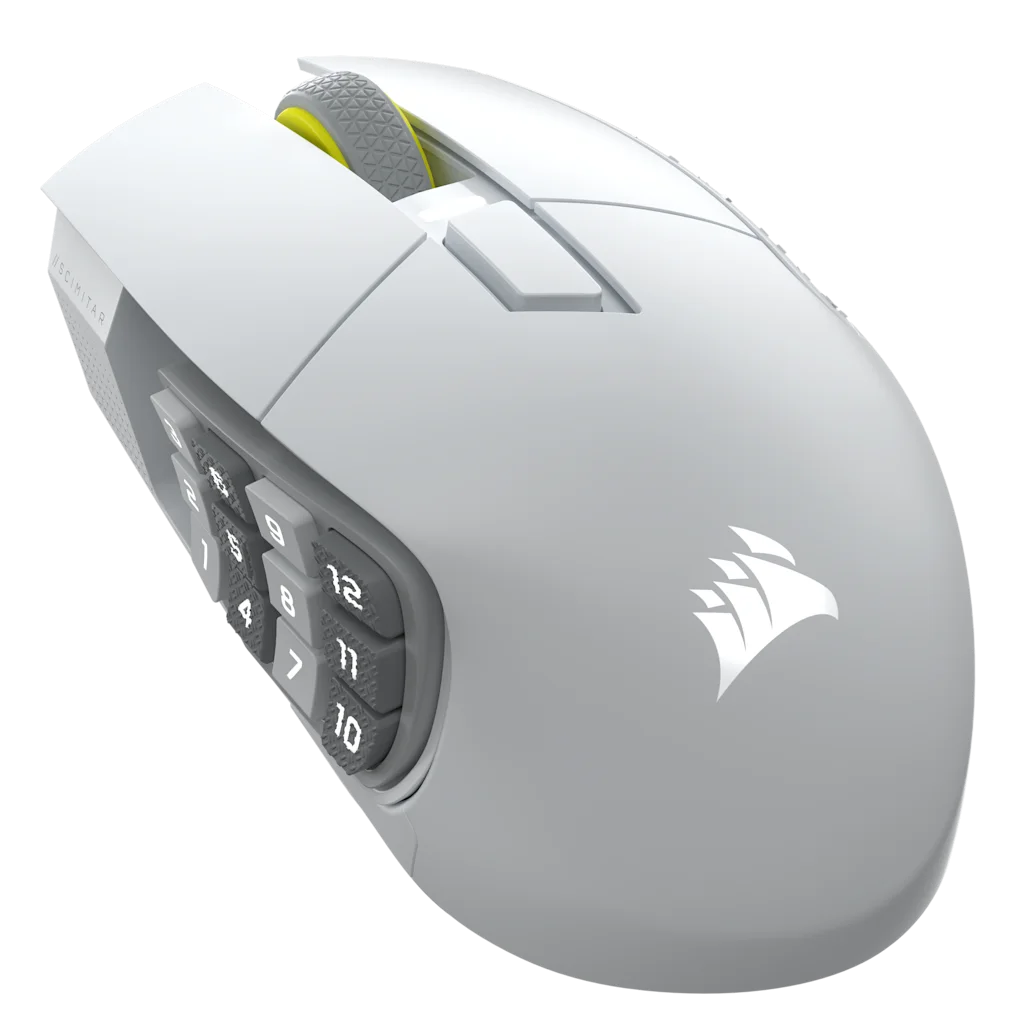
White Corsair Scimitar Elite Wireless SE with its 12-button side panel
Best for an adjustable 12-button grid

Corsair Scimitar Elite Wireless SE (White)

Choose it if: you want to reposition the full 12-button panel. The Key Slider gives it up to 8 mm of travel.

Tradeoff: it weighs 114 g, has 16 programmable buttons, and has no wheel-tilt inputs.

Corsair Scimitar Elite Wireless SE (White)

Decision specs

SteelSeries Aerox 9 Wireless vs Corsair Scimitar Elite Wireless SE, decision specs
Spec Aerox 9 Wireless Scimitar Elite Wireless SE (White) Edge
Weight89 g114 gAerox 9
Size128.8 mm long, 62.8–68.2 mm wide119.23 × 73.48 × 42.17 mmNeither; dimensions alone do not predict fit
Side grid12 fixed buttons in offset rows12 buttons on an 8 mm Key SliderScimitar SE for adjustability
Programmable buttons18, including wheel tilt16; standard scroll wheelAerox 9 for button count
Main switches and sensorGolden Micro IP54 mechanical switches; TrueMove Air, 18,000 CPIOptical switches; MARKSMAN S optical sensor, 33,000 DPINo direct winner from these specs
Dust and water protectionIP54 AquaBarrierNo IP rating listedAerox 9
Aerox 5 Wireless alternative74 g; 9 programmable buttons, including five side controls.

Manufacturer-listed specifications: SteelSeries Aerox 9 and Corsair Scimitar Elite Wireless SE White.

Separate options: the Aerox 5 Wireless weighs 74 g and has five side controls; the Razer Naga V2 HyperSpeed has a 12-button grid. Neither replaces the two compared models.

Which one for WoW or FFXIV?

WoW

Map the 12 side buttons to Action Bar 1: 1 through 0, minus, equals. Assign rotation abilities to whichever Aerox 9 buttons you can reach comfortably; its side grid stays fixed. Wheel tilt adds two programmable inputs, such as focus target or a raid marker.

On the Scimitar SE, adjust the panel to a position that suits your thumb, then use the same key map. Shift and Ctrl layers can add Action Bars 2 and 3. See the WoW MMO mouse setup.

FFXIV

Both grids can map one-to-one to a 12-slot hotbar, with Shift and Ctrl layers for hotbars 2 and 3. See FFXIV MMO mouse setup.

Button maps for WoW Action Bar 1

Suggested key maps, not required rotations.

Four groups of three keys show the Aerox 9's offset side grid. Keys 4 through 9 are one suggested rotation group; assignments can be changed to suit your layout, with two more inputs on wheel tilt. Aerox 9 Wireless · fixed offset grid 123 456 789 0-= 4–9: rotation 1–3 and 0 - =: mount, hearth, long cooldowns Wheel tilt left and right: two more binds
Schematic, not to scale. Keys 4–9 are an example rotation group; choose assignments that fit your layout.
The Scimitar Elite Wireless SE default side map shows keys 1 through 9, 0, minus, and equals in a three-row, four-column grid. An arrow shows the Key Slider's 8 millimeter travel. Scimitar Elite Wireless SE · Key Slider 1234 5678 90-= Action Bar 1CooldownsDefensives Slides 8 mm with the included 2.5 mm Allen key Default profile: 1 through 0, minus, equals
The Scimitar's 3 by 4 grid sends the default keys shown. Slide the panel to place it under your thumb.

Software and keybind setup

Use SteelSeries GG to configure the Aerox 9's side buttons and wheel tilt. Use Corsair iCUE for the Scimitar SE's side-button assignments. Start with one keyboard key and confirm the game receives it before mapping a full action bar.

The mouse app sets the key a button sends; WoW or FFXIV binds that output to an action. Check each app's current operating-system requirements and test the layout after switching profiles or connection modes.

SteelSeries GG · Corsair iCUE button-assignment instructions

The difference

Thumb grid: fixed or adjustable

The Aerox 9's 12 side buttons stay in a fixed, offset layout. The Scimitar's Key Slider moves its full 12-button panel up to 8 mm. That adjustment changes where the grid sits under your thumb, but it does not change button size or spacing.

Weight and button count

The Aerox weighs 89 g; the Scimitar is listed at 114 g, a 25 g difference. SteelSeries lists 18 programmable buttons for the Aerox 9, including wheel tilt; Corsair lists 16 for the Scimitar SE. The added controls and lower listed weight favor the Aerox 9 when the fixed grid suits your layout.

Which one fits your raid night?

Lower listed weight

SteelSeries Aerox 9 Wireless

89 g, compared with 114 g for the Scimitar.

Wheel tilt inputs

SteelSeries Aerox 9 Wireless

The wheel tilts left and right for two additional inputs.

Adjustable side-button position

Corsair Scimitar Elite Wireless SE

Move the 12-button panel up to 8 mm to change its position.

Optical primary switches

Corsair Scimitar Elite Wireless SE

The Scimitar SE uses optical left and right switches.

What neither one fixes

Both are right-handed 12-button grids. The Scimitar slider changes panel position, not button size or spacing. If you want fewer side controls, the five-button Aerox 5 Wireless is a different option. A mouse will not sort an overloaded bar layout; see WoW MMO mice for small hands for other layouts.

Questions about Aerox 9 Wireless vs Scimitar Elite Wireless SE

Why might the Aerox 9's side buttons be harder to position?

The Aerox 9's 12-button side grid is fixed, while the Scimitar's full grid can slide up to 8 mm. The Aerox 9's shell is 128.8 mm long; Corsair lists the Scimitar at 119.23 mm. The slider changes button position, but dimensions do not predict fit for any specific hand.

Does the honeycomb shell on SteelSeries Aerox mice prevent spill damage?

No. SteelSeries lists IP54 AquaBarrier protection for the Aerox 9 Wireless and Aerox 5 Wireless and says it protects internal circuitry from dust and water. That classification is not a guarantee against damage from spills, immersion, or every exposure condition. Keep liquids away from either mouse.

What lighter alternative has fewer side buttons than the Aerox 9?

The Aerox 5 Wireless weighs 74 g and has five side controls within nine programmable buttons. It is lighter, but it offers fewer thumb controls than the Aerox 9. If you want a full 12-button grid, the Scimitar Elite Wireless SE or Razer Naga V2 HyperSpeed keeps that layout.

Does the Aerox 9 have more programmable inputs?

Yes. SteelSeries lists 18 programmable buttons for the Aerox 9, including left and right wheel tilt. Corsair lists 16 for the Scimitar Elite Wireless SE, whose scroll wheel does not tilt. That gives the Aerox 9 two additional inputs, though the Scimitar lets you reposition its 12-button side panel.

MMOSetup interactive tool

Visual MMO Mouse Keybind Explorer

Choose a game, role, and physical layout. Then tune the binds to match how your hand actually rests.

We don't run ads but we do have affiliate links for some products. As an Amazon Associate I earn from qualifying purchases.

Help me choose a mouse

Compare layouts that match your preferences. If your current mouse already covers your bindings, you can keep using it.

1. Pick a game
Role preset
2. Pick a mouse

Physical map

Mouse layout

Select a control below, or enlarge the map to use its numbered markers.

01 · Thumb 11Primary rotation
02 · Thumb 22Secondary rotation
03 · Thumb 33Area action
04 · Thumb 44Interrupt★ home row
05 · Thumb 55Defensive★ home row
06 · Thumb 66Mobility★ home row
07 · Thumb 77Utility
08 · Thumb 88Target swap
09 · Thumb 99Cooldown
10 · Thumb 100Potion
11 · Thumb 11-Mount / travel
12 · Thumb 12=Extra utility
13 · Left clickMouse 1Left click
14 · Right clickMouse 2Right click
15 · Wheel clickMouse 3Wheel click
16 · Tilt leftF1Interrupt
17 · Tilt rightF2Secondary rotation
18 · Index edge 1F3Area action
19 · Index edge 2F4Interrupt

Specifications are from the linked SteelSeries and Corsair product pages.

Last checked