MMO controls · comparison

Redragon M913 vs UtechSmart Venus Pro: which should you buy?

The M913 and Venus Pro are close on buttons and connection modes. Battery behavior and charging hardware do more of the deciding.

The short answer

Choose the Redragon M913 if a charging dock and its 12-button grid are your priority. Choose the UtechSmart Venus Pro if you want a lighter wireless MMO mouse with a stated 70-hour battery figure and wired fallback.

Page freshness
Before orderingRecheck the exact configuration

Which setup fits your daily routine?

This pair shares a 12-button grid and 2.4 GHz/wired modes. The M913 adds a dock; the Venus Pro keeps charging to USB and lists up to 70 hours.

As an Amazon Associate I earn from qualifying purchases. Affiliate disclosure: MMOSetup may earn a commission from qualifying purchases. Recommendations explain the use case and tradeoff first.

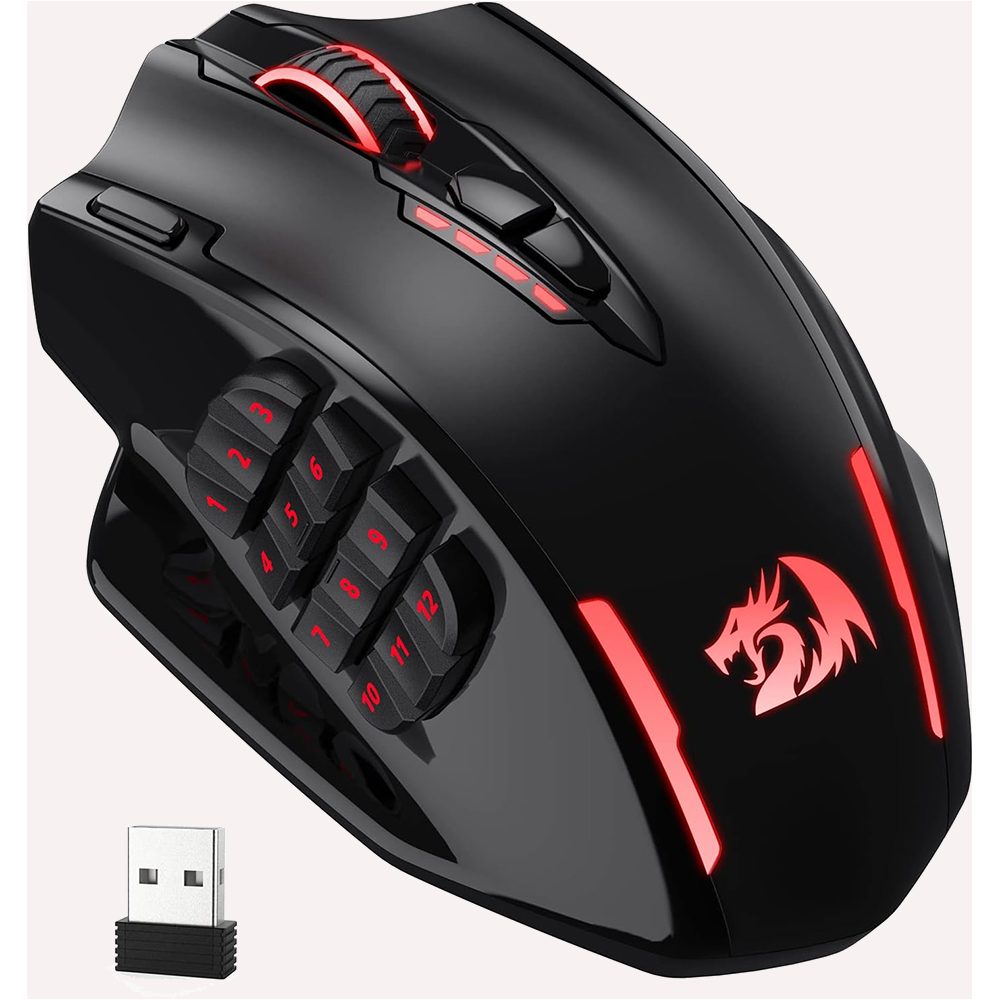
Redragon M913 manufacturer product image
Main pick: Redragon M913

Redragon M913

Best for: a fixed PC desk where a charging dock matters more than minimizing mouse weight.

Tradeoff: its published 170 g weight can be a poor fit if you lift the mouse often.

The M913’s dock gives the receiver, cable, and mouse one home, which is its practical advantage at a permanent desk.

Check current price on Amazon
UtechSmart Venus Pro manufacturer product image
Alternative: UtechSmart Venus Pro

UtechSmart Venus Pro

Best for: a rechargeable MMO mouse with a dock and a 12-button grid.

Tradeoff: its battery rating changes with lighting mode, while the Venus Pro lists up to 70 hours.

The controls are effectively tied in this table. Choose based on how you plan to charge the mouse, not the button count.

Check current price on Amazon

How Redragon M913 and UtechSmart Venus Pro differ where it matters

The shared button count is not a useful tie-breaker here. Battery claims use different lighting conditions, so the charging and software rows deserve the weight.

Redragon M913 vs UtechSmart Venus Pro decision specifications
Decision point Redragon M913 UtechSmart Venus Pro Edge
Wireless and wired use 2.4 GHz or USB-C wired 2.4 GHz or wired dual modes Tie
Thumb-grid controls 12 side buttons; 16 buttons total 12 side buttons; 16 programmable buttons Tie
Battery claim 45 hours with lighting; 80 hours eco mode Up to 70 hours Depends on lighting
Charging approach Dock or USB-C cable USB cable M913
Software Redragon programming software UtechSmart software Depends on your existing stack

What changes between Redragon M913 and UtechSmart Venus Pro

Connection and charging

The dock is a desk habit, not a spec-sheet trophy. The M913 can return to its dock after a session, which is useful if you leave a receiver and cable in one fixed place. The Venus Pro needs its cable when its battery is low. That is a small difference until a shared desk or travel bag makes every loose cable noticeable.

The grid under your thumb

Both mice use a familiar MMO layout: a thumb grid intended for frequent binds. The important question is reach. A 12-button grid helps only if you can distinguish rows without changing grip. The M913 is the heavier option on paper; the Venus Pro is the better starting point for a buyer who wants less mass under the hand.

Do not overread the headline spec

Manufacturer battery claims use different conditions, so they are not a stopwatch comparison. Redragon quotes separate lighting and eco figures, while UtechSmart quotes up to 70 hours. Treat those as charging expectations, not a promise for your own brightness, polling, or sleep settings.

How this fits an MMO desk

These are recommendations. For an MMO desk, pair either mouse with a deliberate keybind plan; the WoW setup hub explains how peripherals fit around the rest of a long-session layout.

Which wireless 12-button layout fits?

Fixed primary desk

Redragon M913

The M913 fits a desk where a charging dock is useful between sessions.

Second machine or changed routine

UtechSmart Venus Pro

The Venus Pro fits if USB charging and up to 70 hours matter more than having a dock.

Profile-building night

Either, after fit is confirmed

Both list 12 side buttons and 16 total programmable controls. Map the common core before adding extra commands.

Travel or shared desk

Match the maintenance pattern

The M913's dock or USB-C options favor a setup with a fixed charging spot. The Venus Pro is simpler if a USB cable is already how you charge.

What neither one fixes

Neither mouse makes a crowded 12-button grid easier to memorize, supplies game-specific profiles, or solves a poor desk surface. If your thumb cannot comfortably reach the far row, more assigned commands will not help. Confirm the Windows software and exact color listing before ordering.

Questions about Redragon M913 vs UtechSmart Venus Pro

Does the M913 include a charging dock?

The Redragon M913 product page describes a charging dock and USB-C wired use. That makes it the better fit for a fixed desk where you want one obvious place to charge the mouse.

Is the Venus Pro a current wireless model?

The current U.S. Amazon listing used here is the purple UtechSmart Venus Pro Wireless MMO Gaming Mouse, ASIN B0D9NK8H9W. It is a current successor configuration, replacing the unrelated wired Venus ASIN previously used on this URL.

Which mouse has more MMO buttons?

Both advertised configurations provide a 12-button thumb grid and 16 programmable controls. This comparison therefore favors physical fit, charging routine, and connection preference instead of pretending the button count decides it.

Can either mouse be used wired?

Redragon lists the M913 for USB-C wired or 2.4 GHz wireless use, and the Venus Pro listing describes wired and wireless dual modes. Check the box contents on the live listing because bundled cables and receivers can change.