Home / Versus / Razer Tartarus Pro vs Keychron K0 Max
Gaming keypads · WoW, FFXIV and OSRS
Razer Tartarus Pro vs Keychron K0 Max
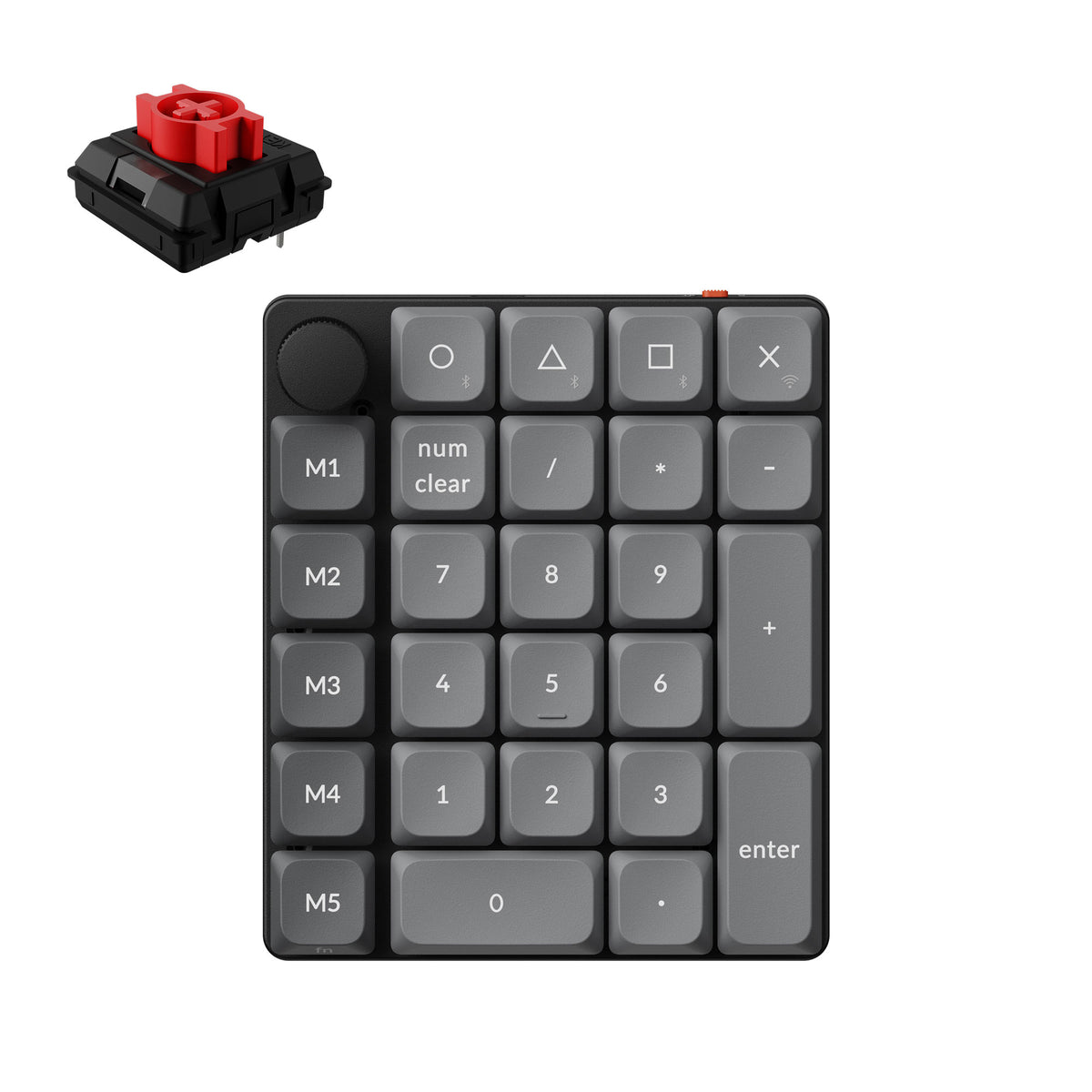
The Razer Tartarus Pro pairs 32 programmable keys with an 8-way thumbpad. The Keychron K0 Max is a 27-key numpad with five M keys and Bluetooth, 2.4 GHz, and USB-C connections.
Choose the Razer Tartarus Pro for one-hand WoW or FFXIV bars built around 32 programmable keys and an 8-way thumbpad. Choose the Keychron K0 Max for a 27-key numpad with Bluetooth connections to three devices. This comparison follows the listed layouts and connections.
AssessmentManufacturer specifications
SourcesRazer and Keychron product pages
Choose by hand position and connection
The Tartarus Pro puts an 8-way thumbpad beside programmable keys. The K0 Max is a 27-key numpad that connects to three Bluetooth devices.
We don't run ads but we do have affiliate links for some products. As an Amazon Associate I earn from qualifying purchases.
Thumbpad action keypad
Razer Tartarus Pro
Choose it if: you want 32 programmable keys and an 8-way thumbpad.
Tradeoff: it is wired and uses Razer Synapse for software setup.
Actuation adjusts from 1.5 to 3.6 mm; the wrist rest has two positions.
Unlimited macro length via Synapse; 8 profiles toggled by side button
QMK and Launcher web app for remapping and macros
Tartarus for listed profile detail; K0 for browser remapping
Connections and battery
Wired keypad; braided cable
2.4 GHz, Bluetooth 5.3 (3 devices), USB-C; 750 mAh; up to about 50 h at lowest RGB brightness
K0 for wireless use; Tartarus for a wired pad
Software and operating systems
Razer Synapse
QMK; Launcher web app; macOS, Windows, Linux
K0 has three listed operating systems
Wrist rest
Adjustable between two positions
None listed by Keychron
Tartarus lists an adjustable rest
Size and weight
Not published
99 x 116 mm; 176.3 g
K0 has published measurements; no direct size comparison
Keychron rates the K0 Max for up to about 50 hours at lowest RGB brightness. If you need Tartarus Pro dimensions or weight, ask Razer for them before buying.
Razer Tartarus Pro vs Keychron K0 Max: hand position decides
The layout tells you which controls sit by your thumb.
One puts a thumbpad beside programmable keys
Tartarus Pro has 32 programmable keys and an 8-way thumbpad assignable to navigation or other commands. K0 Max has a 27-key numpad, a knob and five M keys. Choose the former for thumb commands, the latter for number entry.
Actuation and switch replacement are different choices
Tartarus Pro's Analog Optical switches adjust from 1.5 to 3.6 mm; Rapid Trigger can reset on upward motion as low as 0.1 mm. K0 Max uses hot-swappable Keychron Milk POM low-profile mechanical switches. Choose adjustable actuation or hot swap. If you plan to replace K0 Max switches, confirm compatible models with Keychron before buying.
Macro limits and profile switching favor separate workflows
Razer lists unlimited macro length through Synapse and eight profiles toggled on the fly with a side button. K0 Max uses QMK firmware and the Keychron Launcher web app for remapping and macros. Razer states the profile count; Keychron documents a browser-based remapping path and lists macOS, Windows and Linux.
Wireless options and measurements belong to the K0 Max
Tartarus Pro is wired with a braided cable. K0 Max supports 2.4 GHz, Bluetooth 5.3 to three devices, and USB-C. Keychron lists 750 mAh and up to about 50 hours at lowest RGB brightness. K0 is 99 x 116 mm and 176.3 g; Razer gives no matching dimensions or weight.
When to choose each keypad
The Tartarus Pro favors thumbpad commands; the K0 Max keeps number entry and connects to three Bluetooth devices.
WoW bars under one hand
Razer Tartarus Pro
For WoW bars, Tartarus Pro puts 32 programmable keys and an 8-way thumbpad under one hand; assign the pad to navigation or another command. See the WoW hub and keypad guide.
FFXIV hotbar commands
Razer Tartarus Pro
For FFXIV hotbars, Tartarus pairs programmable keys with an 8-way thumbpad. Check whether its two-position wrist rest and thumbpad reach suit your hand. See the FFXIV hub and keypad guide.
One numpad across devices
Keychron K0 Max
Choose K0 Max when one numpad needs to connect to three Bluetooth devices. It also supports 2.4 GHz and USB-C; its 27 keys and five M keys remain available.
Number entry plus macros
Keychron K0 Max
K0 Max keeps number entry on a 27-key numpad and adds five M keys. Launcher handles remapping and macros; Keychron lists macOS, Windows and Linux.
Check the thumbpad reach and key feel before choosing. The Tartarus Pro's two-position wrist rest gives you an adjustment option; K0 Max's 99 x 116 mm dimensions give you a published footprint. Ask Razer for Tartarus Pro measurements if you need a direct size comparison.
Plan the 8-way pad around a navigation or game command you use. Both layouts need your own assignments in Razer Synapse or QMK with Keychron Launcher.
Questions about Razer Tartarus Pro vs Keychron K0 Max
Which one puts more controls under one hand?
The Razer Tartarus Pro has 32 programmable keys, including an 8-way directional thumbpad. The Keychron K0 Max has a 27-key numpad, knob and five M keys. Those totals describe different layouts, so choose by whether you want thumb commands or number-pad keys.
Can the K0 Max connect to more than one computer?
Keychron lists Bluetooth 5.3 connections to three devices, plus 2.4 GHz and wired USB-C. That fits a setup where one numpad serves several connected systems. Tartarus Pro is the wired option, so K0 Max has the multi-device edge when you use several systems.
What does Rapid Trigger do on the Tartarus Pro?
Razer says Rapid Trigger resets on upward movement as low as 0.1 mm instead of at a fixed point. Tartarus Pro Analog Optical switches also let you adjust actuation from 1.5 to 3.6 mm. These are listed features.
Can I use Keychron Launcher for K0 Max macros?
Keychron lists QMK firmware and the Keychron Launcher web app for key remapping and macros. It also lists support for the K0 Max on macOS, Windows and Linux. Remapping happens in Launcher, giving you a browser-based setup path on those operating systems.
Does the K0 Max battery claim apply at every RGB level?
No. Keychron lists up to about 50 hours at lowest RGB brightness and a 750 mAh battery. That maximum applies at the listed brightness setting. The Tartarus Pro is wired, so there is no battery figure to compare.