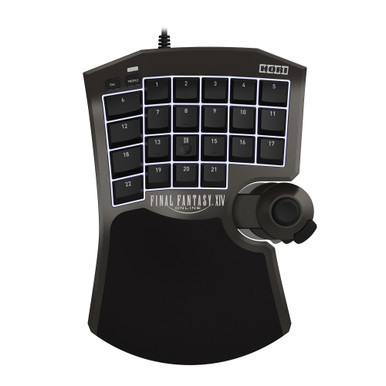
FFXIV gaming keypad setup: map hotbars without relearning jobs
A keypad is useful when it gives one hand a stable physical map for movement, modifiers, and recurring role actions. Start with FFXIV's input mode, then map ordinary keys to hotbars instead of turning every job into a new hardware profile.
A keypad helps when one hand needs a stable place for movement, modifiers, and recurring role actions. Map ordinary keys first, let FFXIV assign the actions, and keep a keyboard or gamepad nearby for chat, menus, and recovery. Choose the F14 for FFXIV-specific profiles, or the Tartarus V2 when a conventional fixed key field matters more.
FFXIV keeps action ownership while the physical map stays stable across jobs. Verify platform mode and companion software before you assume the same stick or profile behavior on every system.
FFXIV already supports keyboard, mouse, and gamepad. A keypad is optional: use it when one hand should own movement, modifiers, and repeated hotbar roles, and keep the keyboard or gamepad for chat, menus, and recovery.
Scroll horizontally to compare all four columns.
FFXIV gaming keypad decision paths
Path
Choose it when
What it solves
Limit
HORI F14
You want an FFXIV-branded keypad and documented profile controls.
Creates a dedicated one-hand layer around profiles and configurable controls.
Check platform mode and the current companion-app path before play.
Razer Tartarus V2
You want a familiar fixed keypad for ordinary PC keybinds.
Keeps a compact key field near one hand while FFXIV controls the action assignment.
It is not an FFXIV-specific control record; verify current software support.
Keyboard or gamepad
Your current control path is reliable or you switch between systems.
Preserves native chat, menus, targeting, and known fallback behavior.
May leave more movement or hotbar reach on the primary device.
Controlled setup
Map physical zones to hotbar roles.
Save a clean FFXIV configuration and create a fresh keypad profile before changing combat binds.
Map only ordinary keyboard inputs first. Keep the hardware profile about physical keys, not job ability names.
Make a visible hotbar mirror the keypad rows or zones while the layout is being learned.
Place movement, one modifier, interrupt, role action, movement tool, and main defensive before adding lower-frequency utility.
Change the in-game hotbar assignment when switching jobs. Keep the physical keypad grammar stable unless the input mode itself changes.
Use product controls to support the map, not to replace it.
The F14 is the FFXIV-specific path with 21 programmable keys, eight profiles, and stick-mode controls in HORI's app. The Tartarus V2 is the simpler fixed keypad when familiarity matters more than FFXIV branding.
01 / F14 profile
Keep profile roles boring
Use profiles for a deliberate platform or control-mode change, not for every job. A shared physical map is easier to carry between jobs than a collection of ability-specific profiles.
02 / Tartarus layer
Keep the key field legible
Give movement, modifier, and role actions fixed homes. Add a layer only after the first set of keys works in FFXIV without searching.
03 / Job handoff
Change actions in the game
When a job changes, update the hotbar assignment in FFXIV while keeping physical positions meaningful. The device should not have to know whether the button is a spell, role action, or crafting command.
04 / Platform check
Verify the active mode
The F14's platform and analog behavior are mode-dependent. Read the current product and app instructions before assuming the same stick or profile behavior on PC, PS5, or PS4.
Read the fit and tradeoff before opening the listing or manufacturer record.
As an Amazon Associate we earn from qualifying purchases.
HORI Tactical Assault Commander F14, FFXIV Black Edition
Best for: FFXIV-first players who want a dedicated keypad identity, multiple profiles, and documented control-mode settings.
Tradeoff: platform behavior and analog mode need a deliberate check before you use the same map on another system.
Why it fits: HORI's official record identifies model HPC-047U, 21 programmable keys, and eight profiles; the companion app covers key assignment, profiles, stick mode, and dead zones.
Best for: players who want a familiar fixed keypad to send ordinary keybinds into FFXIV.
Tradeoff: it does not carry the FFXIV-specific product framing of the F14, so the useful work is your own stable hotbar map and a current software check.
Why it fits: the fixed key field can serve as a compact one-hand keyboard layer while FFXIV keeps ownership of the action assignment and job hotbars.
Exact model record: RZ07-02270100-R3U1, Razer Tartarus V2.
Amazon listing B07754PYFK was sold new by Amazon.com when checked on September 24, 2026; confirm the seller before you buy.
Keep the keyboard or gamepad within reach. A keypad is a control layer, not a replacement for text entry, configuration, troubleshooting, or every menu shortcut.
Compare
Compare the keypad bodies.
The hotbar map stays on this page. These comparisons settle two named keypads.
Most keypad problems come from changing too many layers at once. Keep the hardware map stable, let FFXIV hotbars carry job-specific actions, and test again when platform mode or software changes.
Is a gaming keypad good for FFXIV?
It can be useful when one-hand reach is the problem and you are willing to keep a stable map. It is optional, and it does not replace FFXIV's native keyboard, mouse, or gamepad paths.
Should I use the F14's analog mode?
Only after checking the active platform and current HORI instructions. Start with ordinary keyboard inputs so the first test isolates the map from mode-specific behavior.
Should the keypad profile change for every job?
Usually no. Keep the physical keys stable and change the FFXIV hotbar assignment. A separate profile is justified when the control mode or platform really changes.
Can one keypad press run a sequence?
Square Enix prohibits unauthorized automation software or hardware designed to modify gameplay. MMOSetup's conservative boundary is one ordinary game input per keypad press, so do not use a hardware sequence for gameplay.
Use the surrounding owners for adjacent FFXIV setup questions.
Use the FFXIV hub for the broad control path, the MMO-mouse guide for thumb-grid decisions, and the Tartarus-vs-F14 comparison when those two devices are your shortlist.