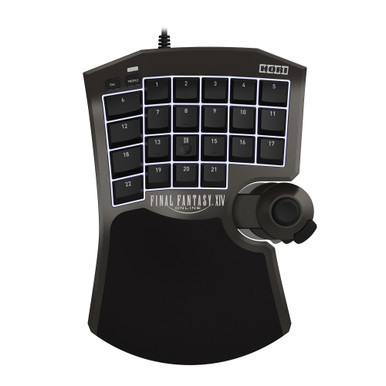
Should I get the HORI F14 or the Tartarus V2 for FFXIV?
Get the F14 if you want analog movement on PC, eight profiles stored on the keypad, or PS5 support. Get the Tartarus V2 if you bind FFXIV like a keyboard, want an adjustable palm rest, and don't mind running Synapse. r/ffxiv players split on feel: some dislike the F14's upright stick.
Does the F14's analog stick work on PS5?
Only as digital directions. HORI says the F14 works as a keyboard on PS5 and PS4, so the stick maps to four inputs that are either on or off, and analog movement works only on PC. HORI adds that you can use a mouse alongside it on PS5 for finer movement.
Do I need software running for my binds?
For the Tartarus V2, yes. Razer lists no onboard memory, so custom binds, macros, and Hypershift layers need Synapse running on Windows. The F14 saves up to eight profiles on the keypad; you only need HORI's PC app to change keys, the stick mode, or the dead zone.
Is the HORI F14 too big for small hands?
It can be. r/ffxiv players with smaller hands called it significantly larger than their hand and found the flat, upright stick hard to adapt to. The Tartarus V2's palm rest has two positions, and one player's partner removed it to reach the top row. Try both if you can.
Should I wait for the Razer Tartarus V2 Pro?
Razer launched the Tartarus V2 Pro on September 17, 2026, with a full-size TMR thumbstick, 31 programmable controls, and three onboard profiles. That answers the F14's two advantages on this page, analog movement and onboard storage. We haven't checked its Amazon listing, so it isn't linked here.