Macro decks ยท Raid macros and WFH shortcuts

Stream Deck MK.2 vs Loupedeck Live: which should you buy?

Both put a grid of programmable controls next to your keyboard. One is built around icon buttons, the other adds physical dials most button decks skip entirely.

The short answer

Get the Stream Deck MK.2 if you want the most one-touch macro and shortcut triggers with the largest plugin ecosystem, the better fit for raid macros, addon toggles, and WFH app shortcuts. Get the Loupedeck Live if you specifically want physical dials for continuous control like audio levels or scrubbing, on top of a smaller set of buttons. For most MMO and WFH shortcut use, the Stream Deck's larger button count and plugin support make it the easier default.

Page freshness
Before orderingRecheck the exact configuration

Buttons versus buttons-plus-dials.

The Stream Deck bets everything on more icon-labeled triggers. The Loupedeck Live trades some of those triggers for controls a button simply can't do.

As an Amazon Associate I earn from qualifying purchases. Affiliate disclosure: MMOSetup may earn a commission from qualifying purchases. Recommendations explain the use case and tradeoff first.

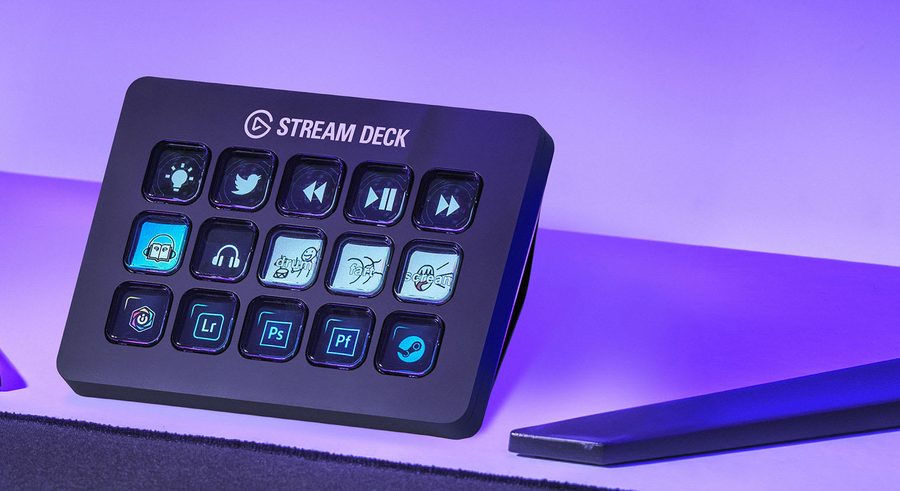
Elgato Stream Deck MK.2 with 15 customizable LCD keys on a desk
Best for macros and shortcuts

Elgato Stream Deck MK.2

Best for: raid macros, addon toggles, and WFH shortcuts where you want the most one-touch triggers you can see at a glance.

Tradeoff: every key is a discrete on/off trigger, with no dial for smooth, continuous adjustment.

15 LCD keys each show their own icon, and Elgato's plugin marketplace covers far more third-party apps and games than Loupedeck's native integration list.

Check current price on Amazon
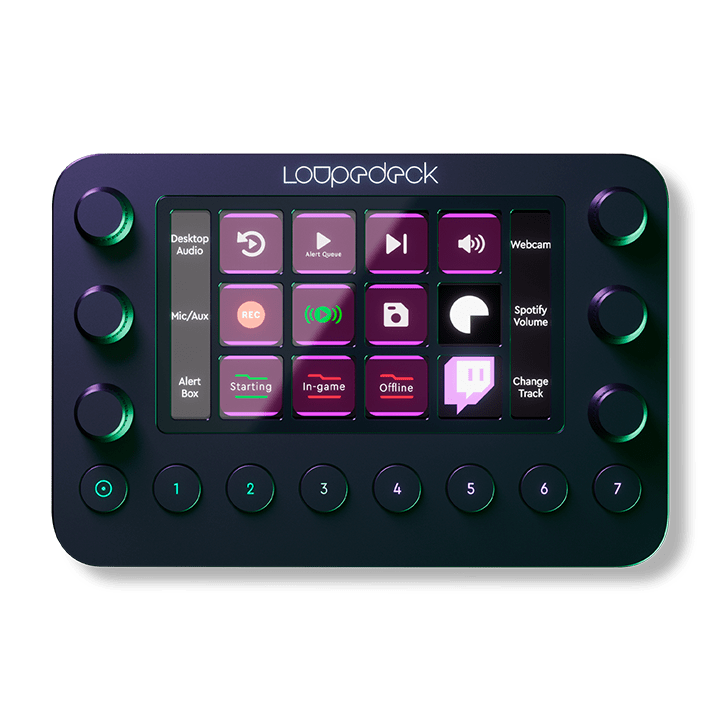
Loupedeck Live console with dials and customizable buttons
Best for continuous control

Loupedeck Live

Best for: anyone who wants physical dials for audio levels, timeline scrubbing, or other adjustments that don't fit a button.

Tradeoff: only 8 buttons for discrete triggers, well behind the Stream Deck's 15.

6 assignable dials plus 8 buttons and a touch display give it a control vocabulary a pure button grid doesn't have.

Check current price on Amazon

How Stream Deck MK.2 and Loupedeck Live differ where it matters

Rows where both are equivalent are left out. Specs are as published by Elgato and Loupedeck.

Stream Deck MK.2 vs Loupedeck Live, decision specs
Spec Stream Deck MK.2 Loupedeck Live Edge
Discrete trigger keys 15 individual LCD keys 8 buttons Stream Deck
Continuous controls None 6 assignable dials Loupedeck
Per-key visual feedback Each key is its own LCD icon Backlit buttons plus a central touch display Stream Deck
App integrations Large third-party plugin marketplace Native list: OBS, Premiere Pro, Lightroom, and others Stream Deck
Weight 270 g (with stand) 168 g Both desk-friendly

Amazon availability and bundle configuration can change. These links open the standalone Stream Deck MK.2 and Loupedeck Live listings described above.

Buttons trigger. Dials adjust.

Two different control vocabularies

A button is either pressed or not, perfect for firing a macro, toggling an addon, or launching an app. A dial can be turned smoothly, which is what you actually want for audio levels, zoom, or scrubbing through a timeline. The Stream Deck MK.2 only has the first kind of control. The Loupedeck Live has both, but gives up 7 buttons compared to the Stream Deck to make room for its 6 dials.

More triggers usually wins for MMO macros

Raid cooldown tracking, addon toggles, and keybind macros are almost entirely on/off actions, exactly what a button excels at and a dial doesn't help with. That's why the Stream Deck's 15 keys, each showing its own icon, tend to matter more for MMO use than the Loupedeck's dials do. If you're organizing keybinds around one of these decks, the layout principles in the OSRS setup hub apply the same way: keep your most-used actions on the easiest keys to reach.

The plugin ecosystem compounds over time

Elgato's Stream Deck plugin marketplace is larger and more actively maintained than Loupedeck's fixed list of native app integrations. That gap matters more the longer you own the device. A bigger, more current plugin library means more of what you want to control has already been built by someone else.

Do you need app control or physical dials?

Raid macros and addon toggles

Stream Deck MK.2

15 icon-labeled keys mean more one-touch actions visible at a glance than the Loupedeck's 8 buttons.

General WFH shortcut panel

Stream Deck MK.2

The larger plugin marketplace makes it easier to wire up arbitrary work shortcuts beyond streaming or gaming.

Live audio or video adjustment

Loupedeck Live

Its 6 dials let you smoothly adjust a level while it's running, something no button grid can replicate.

Photo and video editing

Loupedeck Live

Native integrations with Lightroom, Premiere Pro, and other creative apps pair naturally with its dial-based controls.

What neither one fixes

Neither device replaces properly configured in-game keybinds; they're an additional layer of shortcuts, not a substitute for a keyboard layout that already makes sense. Both take real setup time to configure macros and profiles before they're useful; neither is plug-and-play for MMO-specific use the way it is for basic streaming controls. And both add another USB device and piece of software running in the background, which is a cost some minimal setups would rather avoid entirely.

Questions people ask about the Stream Deck MK.2 vs Loupedeck Live

Which is better for raid macros and addon triggers?

The Stream Deck MK.2, for sheer number of one-touch triggers. Its 15 LCD keys each show a custom icon, so you can see at a glance which cooldown, addon toggle, or macro each key fires. The Loupedeck Live has only 8 buttons for the same kind of discrete trigger, though it adds 6 dials the Stream Deck doesn't have.

What are the dials on the Loupedeck Live actually for?

Continuous control rather than on/off triggers: scrubbing a video timeline, adjusting OBS audio levels, or turning a setting up and down smoothly. The Stream Deck MK.2 has no equivalent: every key is a discrete on/off trigger, which is faster for macros but can't replicate a volume knob's feel.

Does the Stream Deck MK.2 work outside of streaming?

Yes. Its plugin marketplace covers non-streaming uses like launching apps, controlling smart lights, running WFH shortcuts, and triggering game macros, and its LCD keys make it easy to build a control panel for a full workday, not just a broadcast.

Which has the larger plugin or integration ecosystem?

The Stream Deck. Elgato's plugin marketplace is larger and more actively maintained than Loupedeck's native integration list, which covers a set list of apps like OBS, Premiere Pro, and Lightroom rather than an open plugin store.

Can I use either one purely for work-from-home shortcuts?

Yes, both work as general hotkey pads outside of streaming or editing. The Stream Deck's larger plugin library makes it easier to wire up arbitrary WFH shortcuts; the Loupedeck Live's dials add a physical volume or zoom control that a button grid alone can't replicate.