
Foot pedals · Gaming and OSRS

Elgato Stream Deck Pedal vs PCsensor Triple USB Foot Pedal: Best for OSRS & MMOs

Three pedals under the desk handle push-to-talk, mute, and one or two game keys. The choice is whether you want software running or keys stored on the pedal.

The short answer

Choose the Elgato Stream Deck Pedal for OSRS skilling and raid push-to-talk. Its spring sets and app profiles suit the combined setup; use one Hotkey action per OSRS press. PCsensor Triple USB Foot Pedal is the budget alternative for saved fixed keys. Keep OSRS to one input per physical press.

Page freshness Last checked
Before orderingRecheck the exact configuration

Elgato Stream Deck Pedal or PCsensor for OSRS?

Both give you three pedals over USB. The Elgato runs from the Stream Deck app; the PCsensor stores its keys on the pedal.

We don't run ads but we do have affiliate links for some products. As an Amazon Associate I earn from qualifying purchases.

Elgato Stream Deck Pedal, three-footswitch black unit
Pick for OSRS skilling and raid push-to-talk

Elgato Stream Deck Pedal

Choose it if: you want one pedal setup for OSRS skilling and raid push-to-talk, with a single Hotkey action for each OSRS press and app profiles for Discord.

Tradeoff: Stream Deck software must stay open for profiles and plugin actions.

Elgato includes four soft, four medium, and four hard spring sets plus two stoppers.

Check the Stream Deck Pedal on Amazon
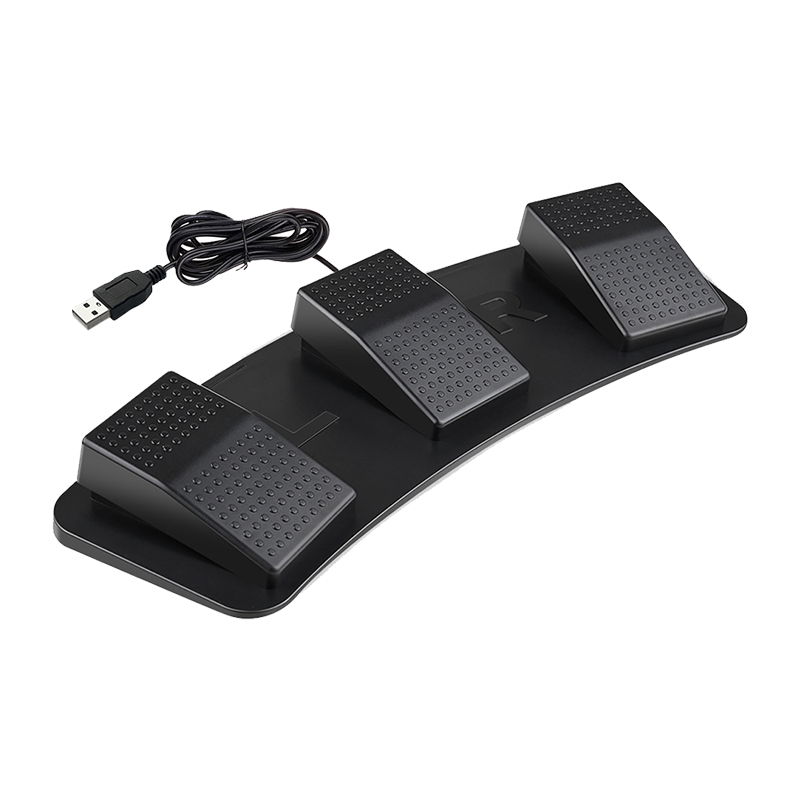
PCsensor triple USB foot pedal with three raised foot switches on a curved base
Budget alternative for saved key output

PCsensor Triple USB Foot Pedal

Choose it if: you want fixed key functions saved to the pedal, with no app running after setup.

Tradeoff: there are no per-app profiles or plugins; change a key through ElfKey.

PCsensor's ElfKey software saves the selected key function to the pedal. PCsensor lists photoelectric and mechanical versions of its triple pedal, so check the selected configuration.

Decision specs

Rows where both match (three pedals, USB) are left out. Specs from Elgato and PCsensor.

Elgato Stream Deck Pedal vs PCsensor Triple USB Foot Pedal, decision specs
SpecElgatoPCsensorEdge
Chassis weight and floor gripElgato technical specs list about 930 g; anti-skid feet and grippy pedal surfacesWeight is not published; floor grip is not specifiedElgato publishes grip details
Spring tension4 soft, 4 medium, and 4 hard spring sets; 2 stoppersNot listedElgato
Software and profile switchingStream Deck app must run for Smart Profiles and plugin actionsElfKey saves functions to the pedal; no app is needed after setupDepends on use
Output typesHotkeys, plugin actions, Multi ActionsKeyboard or mouse functions; other options vary by modelDepends on use
Setup platformsWindows 11, macOS 13+ElfKey (Windows or macOS); USB HID after setupPCsensor
Cable and durability details2.5 m USB-C cable included; USB-C port supports cables up to 5 mPCsensor variants list USB or Type-C interfaces; cable length and replacement details are not publishedElgato publishes cable length

Setting it up for OSRS and other games

OSRS

One press should send one ordinary key. Set a pedal to an interface key you picked in OSRS's Keybinding settings (inventory or prayer, for example), or to Space to continue dialogue. Keep clicking on the mouse.

On PCsensor, choose a plain key output, turn off repeat, and avoid text or macro output. On Elgato, use one Hotkey action instead of a Multi Action. This keeps one physical press to one input.

Jagex's rules prohibit hardware that does things you should do yourself. Check Jagex's current rules before using a pedal. See the OSRS foot pedal setup guide for a one-key setup.

Any PC game

Use one pedal for push-to-talk, another for mute, and a third for a clip or scene. PCsensor sends a configured key that Discord reads directly; Elgato can send the same hotkey or use its Discord plugin while the app runs. Pick a key the game does not already use.

Pedal maps for OSRS and voice chat

Suggested layouts, not required.

Three PCsensor pedals send Space to continue dialogue, the inventory key, and F13 for push to talk. Use one plain key per press. Plain keys, saved to the pedal Space Continue Inv key Inventory F13 Push to talk Type: key. Repeat: off.
Use whatever key you set for the inventory in OSRS's Keybinding settings.
Three Stream Deck Pedal actions handle Discord push to talk and mute, plus an OBS clip. One profile per app Push to talk Discord Mute Discord Clip OBS Smart Profile swaps these when a game has focus.
Plugin actions need the Stream Deck app running.

Software notes

The Stream Deck app needs Windows 11 or later or macOS 13 or later. Keep it running while you use the pedal. Smart Profiles switch by active app, and Multi Actions can run several actions; use one Hotkey action for an OSRS keybind.

For PCsensor, use ElfKey on Windows or macOS to save a key to the pedal. PCsensor says the saved function works without ElfKey running. For OSRS, choose a plain key and avoid text, macro, or mouse-button output.

Where they differ

Software running or keys on the pedal

Elgato says the Stream Deck app must be running for keys to work, and profiles are stored on the computer. PCsensor saves the binding to the pedal, then acts as a USB keyboard.

Adjustable springs or fixed switches

Elgato includes swappable soft, medium, and hard spring sets plus two stoppers. PCsensor lists photoelectric and mechanical versions of its triple pedal, so check the selected configuration.

Which pedal fits your setup?

OSRS keybinds

PCsensor

One plain key per pedal, stored on the pedal.

Discord and OBS

Elgato

Plugins and per-app profiles while the app runs.

Moving between computers

PCsensor

Bindings stay on the pedal, so another computer needs no software.

Spring options

Elgato

Four spring sets and two stoppers.

What neither one fixes

Neither pedal makes a macro safe in OSRS. The rules judge what the input does, not the brand. Combat and clicking stay on the mouse. Test a new binding somewhere harmless before you rely on it.

Questions about the Stream Deck Pedal and PCsensor pedal

Will the PCsensor Triple USB Foot Pedal stay put during OSRS Thieving?

PCsensor does not publish the triple pedal's weight or floor-grip details, so its documentation does not establish whether it will move on your floor. Elgato lists a weight of about 930 g and describes anti-skid feet on the Stream Deck Pedal.

Can you rest your foot on the Elgato Stream Deck Pedal without accidentally clicking?

Yes. Elgato includes two stoppers that lock the center pedal, so you can use it as a footrest. While locked, it cannot send an input; the left and right pedals remain available. The interchangeable spring sets change pedal resistance, but they do not lock a pedal.

Does the Elgato Stream Deck Pedal require an Elgato Stream Deck MK.2 to work?

No. The pedal connects to a computer over USB and is configured with Elgato's Stream Deck software; it does not require another Stream Deck hardware unit. Elgato lists Windows 11 or newer and macOS 13 or newer. Profiles and integrations depend on the software running.

Specs and software details: Elgato's Stream Deck Pedal technical specs, Elgato's Stream Deck Pedal product page, Elgato's Quick Start Guide, and PCsensor's triple-pedal documentation. OSRS input rules are from Jagex.

Last checked