

Blizzard’s Forever panel recap says official gamepad support is planned. That establishes the product direction, not a complete current button map.
WoW: Forever / Controller authority
WoW Forever controller settings and keybinds: a practical setup guide
Blizzard has announced official gamepad support for WoW: Forever. The beta points toward face and D-pad actions, trigger-modified layers, shoulder targeting, and controller navigation, but the exact current interface still needs a client check. Start with exposed controls, bind by job, and test anything that could stop an attack or lose a target.
Prepared reference; verification pending
Pending direct pass
Gamepad support announced
Reports need reproduction
Pending direct verification
After every beta patch
This page separates what Blizzard announced, what external testers report, and what a current-build test still has to establish. Nothing below promises that every input is rebindable, that every handheld is supported, or that a beta workaround is universal.
Quick start
Build a small, reversible first profile.
Use this as a test sequence until the exact current-build UI has been captured.
- Connect before launch. Record controller model, connection type, WoW: Forever build string, date, class, spec, and content.
- Find the controller interface. Record the exact menu path and a screenshot. The package does not authorize a guessed path.
- Start with low-risk positions. Use exposed controls for movement and a low-consequence ability before changing interrupts, targeting, or emergency actions.
- Build the layers the UI exposes. Check neutral, left-trigger, right-trigger, and both-trigger states; do not assume a permanent count or default map.
- Test the failure cases. Try hostile, friendly, party, interact, jump, radial, bags, chat, open world, and a busy group scenario.
- Save a dated record. Capture the layers and page state. If the client offers an export, verify it. Otherwise keep the worksheets below.
Current-build gate
What must be verified before a settled instruction.
Use one row per observation and keep external reports separate from a reproducible current-build check.
Trigger layers
Think in jobs, not fixed defaults.
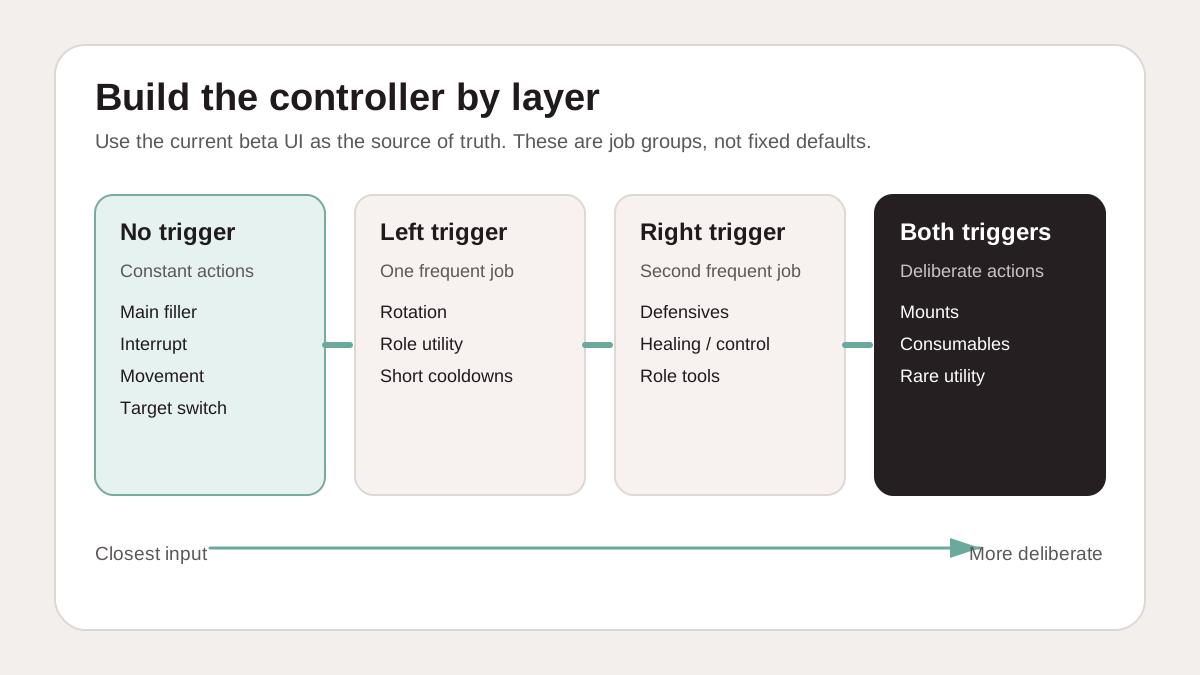
Face buttons and the D-pad are the starting vocabulary. Trigger modifiers add deliberate layers when the current interface exposes them.
Closest inputs
No trigger
Start with constant actions such as a main filler, interrupt, movement, or target switch only after checking which controls the client exposes.
One trigger can hold a frequent rotation or role-utility job. The other can hold defensives, healing, control, or a second role job.
Deliberate inputs
Both triggers
Reserve the most deliberate layer for mounts, consumables, rare utility, travel, or actions that should not fire accidentally.
A demo may show eight positions per layer or a combined total of 28 or 32. Use the current UI, not the demo, as the authority.
Locked versus rebindable
Check each input; do not assume a blank canvas.
External reports describe locked unmodified face-button functions while modified layers expose more choices. That is a lead to reproduce, not a universal rule.
| Input | Default action | Editable? | Evidence / retest |
|---|---|---|---|
| Neutral face / D-pad | |||
| Left-trigger layer | |||
| Right-trigger layer | |||
| Both-trigger layer | |||
| Shoulders / sticks / menu |
Do not add a console workaround, a Retail configuration path, or an addon profile here. If an input is locked in the current build, document the default and make the tradeoff explicit.
Targeting
Target cycling needs a real failure test.
Hands-on demos show shoulder cycling and manual lock as the intended shape. Community reports also describe mixed-action and auto-attack problems. Keep both as test prompts until reproduced.
Reproduction sequence
- Record model, connection, build, class/spec, and zone.
- Cycle three hostiles, including a dense pack.
- Try enemy → self → enemy and friendly → enemy transitions.
- Cycle party targets in both directions, then an NPC or object.
- Lock a target manually, attack, swap, and recover focus.
- Check whether auto-attack stops and whether mouse input recovers.
Safe interim rule
Keep a manual target option and mouse fallback available until the sequence passes. Do not state that shoulder cycling is reliable for every class, role, content type, or target mix.
Record the exact sequence when it fails. A community report that says “targeting is rough” is a lead, not a reproduction.
Bind by job
Keep the priorities stable while the class list changes.
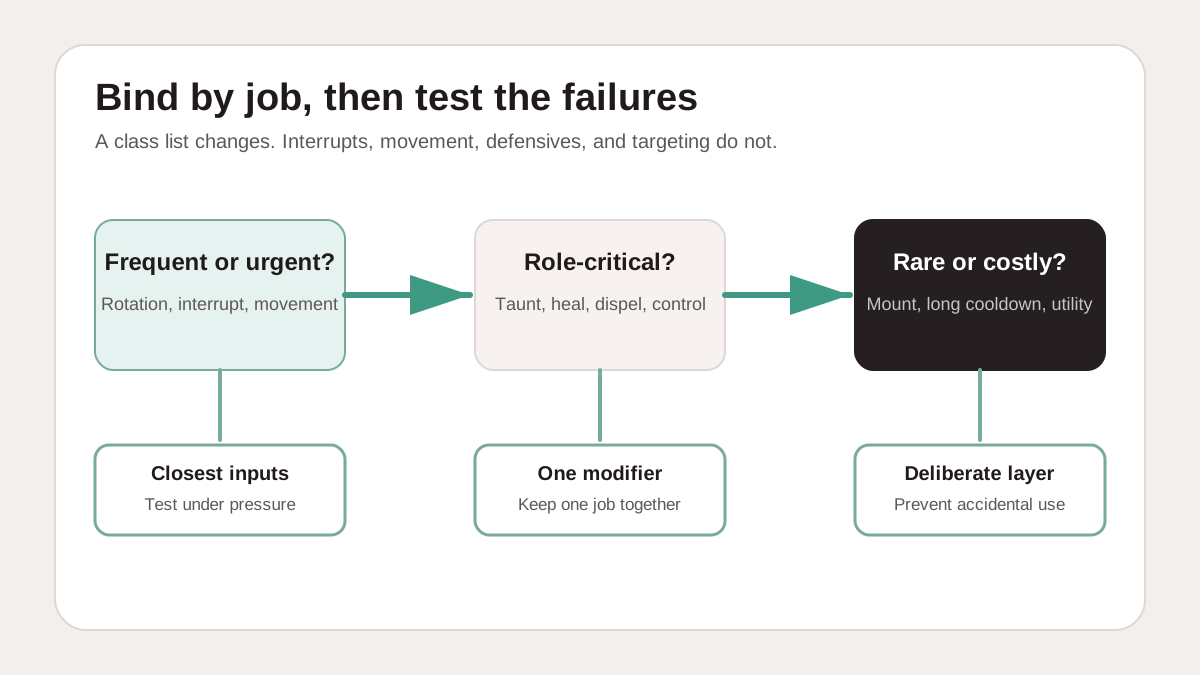
Use the same failure-cost logic for controller and keyboard. The action names change by class; the jobs do not.
Closest inputs
Main builder or spender, interrupt, movement, short defensive, emergency action, and target switch.
One trigger
Secondary rotation, long defensives, cleanse, crowd control, role tools, and frequent cooldowns.
Both triggers
Mounts, consumables, professions, travel, rare utility, and anything costly to trigger accidentally.
For the broader keyboard, mouse, and role map, use the general WoW keybind guide. This page keeps the Forever-specific verification and worksheets here instead of replacing that generic ownership.
Print or save
Worksheets for a dated first pass.
Fill these in after each meaningful change. Blank cells are safer than guessed defaults.
| Job | Action | Neutral | Left trigger | Right trigger | Both triggers | Tested |
|---|---|---|---|---|---|---|
| Main rotation | ||||||
| Interrupt | ||||||
| Movement | ||||||
| Short defensive | ||||||
| Emergency action | ||||||
| Targeting | ||||||
| Role utility | ||||||
| Travel / out of combat |
| Job | Primary key | Modified key | Mouse option | Tested in combat |
|---|---|---|---|---|
| Main rotation | ||||
| Interrupt | ||||
| Movement | ||||
| Defensive | ||||
| Emergency action | ||||
| Target self / party / enemy | ||||
| Role utility |
If the physical problem is a mouse or keypad rather than a controller, keep the hardware decision on the Forever gear guide and use the MMO mouse setup guide for the generic button map.
Build-dated issue ledger
Use reports as leads and keep the workaround narrow.
These are current beta concerns to reproduce, not universal behavior.
Backup and reset
Do not copy a Retail reset path.
The exact Forever backup file, command, and reset scope are not verified. Until a real restore succeeds, screenshot every layer and worksheet, change one group at a time, and log logout, relaunch, disconnect, crash, and patch behavior.
Before resetting, capture the current state. After resetting, confirm whether controller, keyboard, or both were affected. Add a public restore procedure only after it works on the current build.
Handheld gate
Promising is not the same as supported.
No official handheld support or performance claim is made here.
Hardware recommendations stay on the Forever gear guide. Graphics, FPS, and display tradeoffs stay on the ultrawide UI guide. This page owns the Forever input settings and verification method.
Method and sources
What is known, and what is still gated.
Reviewed September 20, 2026. Blizzard’s official panel recap is the source for announced gamepad support. Forum reports and third-party coverage are external leads. Exact menu paths, complete input maps, locked-control rules, targeting guarantees, backup/reset procedures, and handheld verdicts remain open pending a direct current-build check and are not presented as settled.
Blizzard: WoW: Forever What’s Next panel recapBlizzard: WoW: Forever launch and beta announcementOfficial forum lead: controller major issuesOfficial forum lead: controller support feedbackWarcraft Tavern: built-in controller support coverage