Best Fire tablet for OSRS: choose your model, then sideload the game.
For a new buyer, start with the Fire HD 8 (2024) 4GB/64GB if you want the easiest handheld option. The Fire HD 10 gives you more room, and the Fire Max 11 suits a stand. Every Fire tablet on this page requires a sideload through Silk Browser, and you will need to repeat the APK download after weekly OSRS updates.
The Fire HD 8 is the sensible starting point, but sideloading is part of the purchase.
Choose the HD 8 for handheld play. Move up to the HD 10 or Max 11 for a larger screen or a stand, not because setup is easier. Fire OS requires the Silk Browser APK route here, so plan to repeat the download and install after weekly OSRS updates.
Conditional shortlist
Fire tablets worth considering for OSRS
If you are set on Fire, these are the three configurations worth checking. The HD 8 is the first listing to inspect; the larger models buy you more screen, not an easier install.
As an Amazon Associate we earn from qualifying purchases.
Best first check
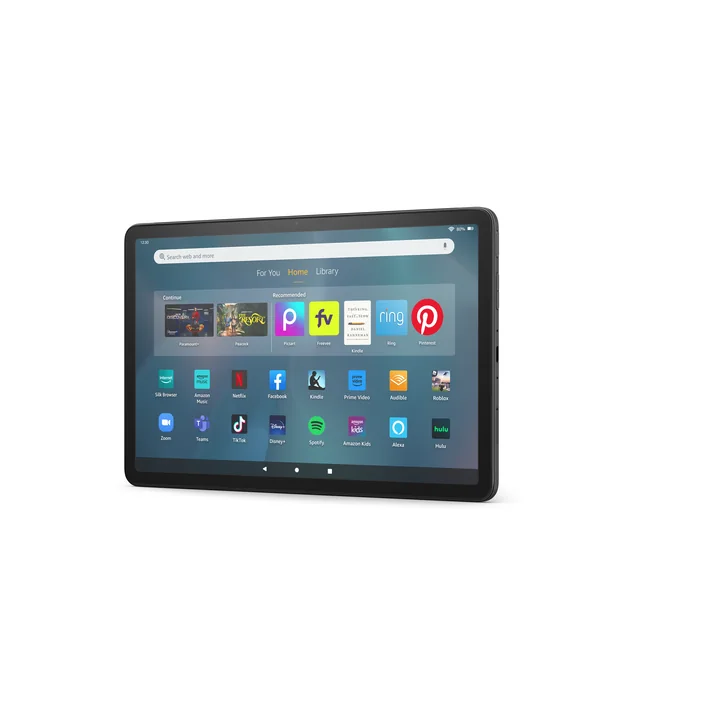
Fire HD 8 (2024, 12th Gen)
4GB / 64GB only
Why start here: It is the smallest option on this page, and the 64GB listing reaches the 4GB Android memory floor.
Choose it for handheld play. The 8-inch 1280×800 display gives you less room for a wiki or split screen than the larger models.
OSRS will be a sideload on Fire OS, with the same weekly APK refresh routine as the larger models.
Sideloading is required; read the steps below before checkout.
Choose it when: You want a 10.1-inch 1080p screen on a stand.
Inspect the 4GB/32GB listing only. Older 3GB HD 10 listings do not meet this page's memory floor, and the 32GB configuration leaves less room after setup.
The larger panel does not remove the Silk Browser sideload or weekly APK refresh.
Use this table to reject low-memory listings and choose a screen. It does not make OSRS a native Fire install.
Swipe to compare the model rows on a phone.
Fire tablet models that change the buying decision
Family and generation
Amazon platform record
Buying implication
Fire HD 8 (2024, 12th Gen)
Android 11 / API 30 / Fire OS 8; Amazon lists 3GB and 4GB versions.
The 4GB/64GB listing is the first one to check. The 3GB version is below this page's memory floor. OSRS still requires the Silk Browser sideload.
Fire HD 10 (2023, 13th Gen)
Android 11 / API 30 / Fire OS 8; current listings include 3GB and 4GB variants.
Choose the 4GB/32GB listing only. Plan for the same sideload and weekly APK refresh.
Fire Max 11 (2023, 13th Gen)
Android 11 / API 30 / Fire OS 8.
Largest screen here for a stand; sideloading and weekly APK refresh are still required.
Fire HD 8 (2022, 12th Gen)
Android 11 / API 30 / Fire OS 8; Amazon lists 2GB and 3GB versions.
Both listed memory options fall below Jagex's current 4GB Android recommendation. Do not choose it for a new purchase.
Fire 7 (2022, 12th Gen)
Android 11 / API 30 / Fire OS 8.
Not part of this shortlist. Its display and memory make the buying case weaker.
Older generations
Platform records vary by generation.
Skip a new purchase unless the exact memory, software, sideload path, and update routine are clear.
Decision boundary
Fire purchase means device plus sideload routine.
OSRS is not a normal Fire store install here. If you do not want to enable Silk Browser installs and repeat the APK after weekly updates, choose a standard Android tablet instead.
Fire tablets require changing the security setting that allows third-party installations. This is the install path for the new-buyer recommendation above.
Allow Silk Browser: Open Settings, tap Security & Privacy, choose Apps from Unknown Sources, select Silk Browser, and turn on Allow from this source.
Download the APK: Open Silk Browser and use a repository you trust, such as APKMirror. Search for Old School RuneScape and download the latest APK.
Install the game: Tap the completed download notification, or open Silk's menu, choose Downloads, tap the OSRS APK, and select Install.
Before buying, make sure the listing and the maintenance routine fit the way you will play.
Swipe to compare the checks on a phone.
Before you buy: Fire tablet OSRS checklist
Check
Pass condition
Stop and re-check
Memory
Choose the exact 4GB listing, with storage that fits the way you will use the tablet.
RAM is hidden, lower, or confused with storage.
Sideload
You are comfortable enabling Silk Browser installs and downloading the OSRS APK from a repository you trust.
You want a normal app-store install with no workaround.
Updates
You can repeat the APK download and install after weekly OSRS updates.
Manual refreshes are a deal-breaker.
Screen and use
HD 8 for handheld play, HD 10 for more room, or Max 11 for a stand.
You need RuneLite, desktop plugins, or a keyboard-first workflow.
Return path
You can return the tablet if the sideload, touch experience, or listing does not fit.
You are building around an untested workaround with no fallback.
Before checkout
Match the tablet to the way you will play.
Choose the HD 8 for handheld play, or move to the HD 10 or Max 11 when a larger screen or stand matters more.
Check that the Amazon listing still shows the intended RAM and storage variant.
Read the sideload steps and decide whether a weekly APK refresh fits your routine.
Keep a return path if the APK, touch experience, or device does not match the listing.
Fire tablets are a conditional OSRS buy. The screen choice is straightforward; the install and update routine is the part to accept.
Install
Sideloading is required.
Enable Silk Browser installs, download the APK, and install it manually. A bigger Fire screen does not remove those steps.
Screen
Pay for size only when you will use it.
The HD 8 is the handheld option; the HD 10 and Max 11 make more sense on a stand. Read the split-screen guide before paying for the larger panel.
Sources and limits
What the model specs can and cannot tell you
The 4GB check narrows the field. The sideload routine decides whether a Fire purchase fits.
Amazon's Fire documentation identifies the platform records, and Jagex publishes the Android baseline. Those specs do not turn Fire OS into a native OSRS install. The sideload steps above describe the required workaround; update behavior can change.
Start with the Fire HD 8 4GB/64GB listing for handheld play. Choose the HD 10 for more room or the Max 11 for a stand, then plan for the required Silk Browser sideload and weekly APK refresh.
Do Fire tablets run OSRS natively?
No. Fire tablets require enabling Silk Browser installs and sideloading the OSRS APK. A bigger model does not remove that requirement.
How do OSRS updates work after a sideload?
OSRS usually updates on Wednesdays. Download and install the newest APK again after each weekly update. Installing Google Play Store first can automate updates, but it adds another workaround.