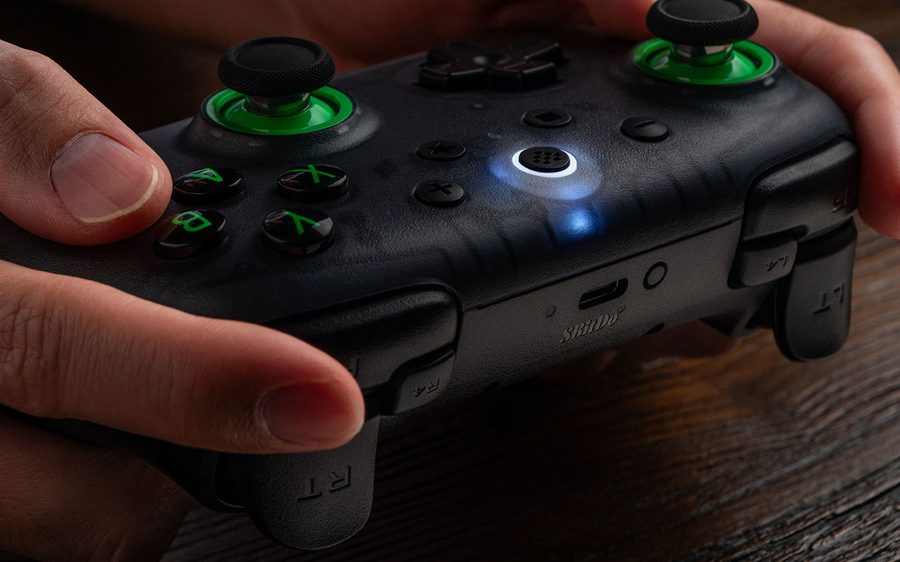
On PC, and for FFXIV's cross hotbar, buy the GameSir Cyclone 2 if you want GameSir Connect to tune stick and trigger dead zones, plus a charging dock. Buy the 8BitDo Ultimate 2C Wireless if you want the firmer D-pad for cross-hotbar slots and no companion app to manage. Both remap their extra buttons on the controller.
Last checked
Before orderingCheck the exact configuration
Pick by D-pad feel or app controls
Both controllers offer drift-resistant sticks. For FFXIV, the D-pad and extra-button setup shape the choice.
Buying through our Amazon links costs you nothing extra and helps keep MMOSetup free. As an Amazon Associate we earn from qualifying purchases.
Best for D-pad slots
8BitDo Ultimate 2C Wireless
Choose it if: you want a firmer D-pad for the left side of the cross hotbar and a pad with no companion app to manage; L4/R4 remap on the controller.
Tradeoff: no companion app for dead zones, no dock, and on Windows it needs its 2.4G adapter or a cable.
Choose it if: you want GameSir Connect to tune dead zones and triggers, plus a charging dock that holds the dongle. Its two back buttons remap on the controller or in the app.
Tradeoff: GameSir lists 229 g net, 11.5 g more than the 2C, and r/Controller users call its D-pad clicky with some play.
8BitDo Ultimate 2C Wireless vs GameSir Cyclone 2 decision specs
Spec
Ultimate 2C Wireless
Cyclone 2
Edge
Sticks
Hall Effect
Mag-Res TMR
Both resist drift
Triggers
Hall Effect
Hall Effect or micro-switch, switchable
Cyclone 2
Extra buttons
L4/R4 bumpers, remapped on the controller
2 back buttons, remapped on the controller (M + back button) or in GameSir Connect
Tie
PC connection
2.4G adapter or USB (Bluetooth is Android only)
2.4G, Bluetooth, or USB-C
Cyclone 2
Polling (2.4G and wired)
1000 Hz
1000 Hz
Tie
Software
None for this model
GameSir Connect
Cyclone 2
Battery and charging
480 mAh; 19 h on 2.4G; USB cable
860 mAh; charging dock
Cyclone 2
Weight
217.5 g
229 g
Ultimate 2C
Specs from 8BitDo and GameSir product pages and Amazon listings.
Which one for FFXIV or PoE 2?
FFXIV
The cross hotbar has 8 slots on each trigger: hold LT or RT, then press the D-pad or a face button for 16 slots per set. Double-tap LT or RT for WXHB. Enable it under Character Configuration → Hotbar Settings → Custom → Expanded Hold Controls. Half of each set sits on the D-pad, so D-pad feel matters here more than in most games. See the FFXIV setup hub.
FFXIV does not read L4/R4 or back buttons as separate inputs. Remap them to a button you already use, on either controller with a button combination (or in GameSir Connect for the Cyclone 2), and they fire that slot. Steam Input can send keyboard keys you bind in-game. A published Steam Input layout uses the 2C's L4/R4 to open WXHB with one press.
PoE 2
PoE 2 plays well on a controller (an r/Controller user's pick), and both pads' extra buttons suit flasks and dodge; see PoE controller vs mouse and keyboard.
Button maps for the FFXIV cross hotbar
Suggested layouts, not required.
FFXIV doesn't read L4/R4 on their own; remapped, they send the button you assign.Back buttons work the same way once mapped on the pad, in GameSir Connect, or in Steam Input.
Software and setup on PC
The Ultimate 2C Wireless has no companion app for tuning. Remap L4/R4 on the controller, and on Windows connect through the 2.4G adapter or cable. GameSir Connect maps the Cyclone 2's two back buttons and adjusts stick and trigger dead zones, vibration, and lighting. The back buttons also remap on the controller (hold M plus L4 or R4). Both work with Steam Input for keyboard mapping.
Where the controls differ
D-pad and extra buttons
r/Controller users who tried both report a firmer D-pad on the Ultimate 2C. Its L4/R4 remap on the controller. The Cyclone 2's two back buttons remap on the controller too (hold M plus the back button), or in GameSir Connect. FFXIV treats a mapped extra button as the button assigned to it.
Software and charging
GameSir Connect adjusts dead zones, vibration, and lighting, and the Cyclone 2's aluminum dock charges the controller and stores its 2.4G dongle. The Ultimate 2C uses its included 2.4G adapter or cable on Windows and charges by USB cable.
Which one fits your FFXIV setup?
Lots of D-pad slots
8BitDo Ultimate 2C Wireless
r/Controller users who tried both prefer its firmer D-pad.
Nothing to install
8BitDo Ultimate 2C Wireless
There's no companion app; L4/R4 remap with a button combination.
Tuned dead zones and triggers
GameSir Cyclone 2
GameSir Connect adjusts stick and trigger dead zones and maps both back buttons.
Pick up and play from a dock
GameSir Cyclone 2
The dock charges it and stores the 2.4G dongle.
What neither one fixes
FFXIV still won't read extra buttons as their own inputs; menus, chat, and crafting lists are still quicker with a keyboard nearby; neither works on Xbox consoles.
Questions about the Ultimate 2C and Cyclone 2 for FFXIV
Which is better on PC, the Ultimate 2C or the Cyclone 2?
The Cyclone 2 if you want GameSir Connect to tune dead zones and triggers, plus a charging dock. The Ultimate 2C Wireless if you want the firmer D-pad and no companion app. Both remap their extra buttons on the controller. r/Controller users who tried both preferred the Cyclone 2 overall, except the D-pad.
Can FFXIV use the L4/R4 or back buttons?
Not as separate buttons. FFXIV doesn't let you assign them in-game. Remap them to a button you already use (both pads do this with a button combination, and the Cyclone 2 also in GameSir Connect), or use Steam Input or reWASD to send keyboard keys you bind to hotbar slots.
Does the 8BitDo Ultimate 2C have software?
Not for tuning. 8BitDo lists no companion app support for the Ultimate 2C Wireless, and an r/Controller user says its software only updates firmware. You remap L4/R4 with a button combination on the controller. The Cyclone 2's GameSir Connect adds dead-zone, trigger, vibration, and back-button settings.
Which D-pad is better for the cross hotbar?
The Ultimate 2C's, by r/Controller accounts. An r/Controller user who tried both called the 2C's D-pad firmer, less wobbly, and the best they had used, and the Cyclone 2's clicky with noticeable play. Half of each cross-hotbar set sits on the D-pad, so this matters more in FFXIV than in most games.
Does the Ultimate 2C connect over Bluetooth on PC?
No. The Ultimate 2C Wireless linked here connects to Windows through its 2.4G adapter or a USB cable; its Bluetooth mode is for Android. The Ultimate 2C Bluetooth is a separate Switch controller. The Cyclone 2 connects to a PC by 2.4G, Bluetooth, or USB-C.
Specs from 8BitDo and GameSir product pages and Amazon listings; FFXIV settings from Square Enix's Lodestone UI guide; r/Controller and r/ffxiv player reports on feel and extra buttons. We did not test these controllers hands-on.