Split keyboards · MMO keybinds and WFH typing

Keychron Q11 vs Freestyle Edge RGB Plus: which should you buy?

Both are split mechanical keyboards. Only one of them actually lets you split far apart and tilt the halves toward your hands.

The short answer

Get the Freestyle Edge RGB Plus if wrist and shoulder comfort is the actual goal, since its 20-inch cable and included tenting kit do things the Q11 can't. Get the Keychron Q11 if you want the better-built, more customizable keyboard and are fine with the halves staying close together and flat on the desk. Most keybind- heavy MMO players chasing comfort should start with the Freestyle Edge.

Page freshness
Before orderingRecheck the exact configuration

"Split" doesn't mean the same thing on both boards.

Both keyboards cut the layout in half. Only one lets you do anything meaningful with the gap.

As an Amazon Associate I earn from qualifying purchases. Affiliate disclosure: MMOSetup may earn a commission from qualifying purchases. Recommendations explain the use case and tradeoff first.

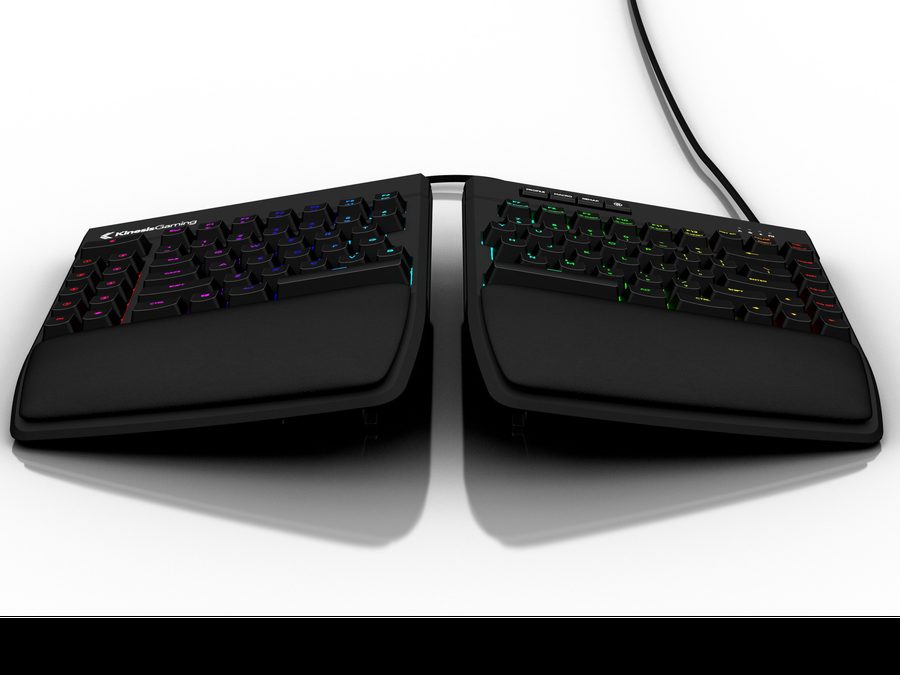
Kinesis Freestyle Edge RGB Plus split mechanical keyboard
Best for wrist and shoulder comfort

Kinesis Freestyle Edge RGB Plus

Best for: players who want the halves genuinely far apart and tilted, with a gaming layout ready on day one.

Tradeoff: the case and keycaps don't match the Q11's machined-aluminum build quality.

A 20-inch cable and an included lift kit for 5, 10, or 15 degrees of tenting are the two things the Q11 simply doesn't offer.

Check current price on Amazon
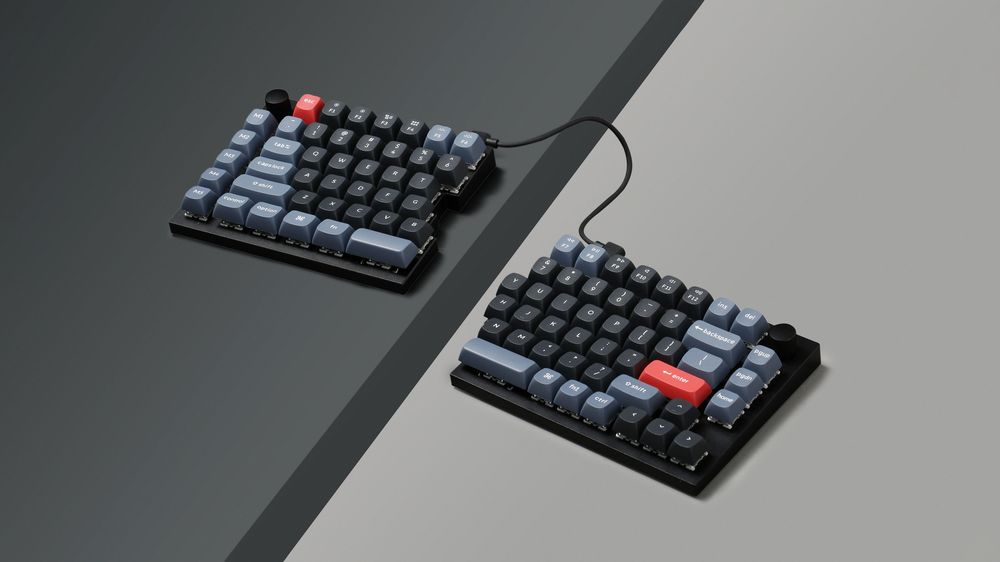
Keychron Q11 split mechanical keyboard, both halves on a desk
Best build quality and customization

Keychron Q11

Best for: typists and QMK/VIA tinkerers who want a premium split board and don't need wide separation or tenting.

Tradeoff: the halves connect over a short cable and the board lies flat with no built-in tenting.

Full aluminum frame, hot-swap sockets, and complete QMK/VIA programmability make it the more refined keyboard on its own terms.

Check current price on Amazon

How Keychron Q11 and Freestyle Edge RGB Plus differ where it matters

Rows where both are equivalent are left out. Specs are as published by Keychron and Kinesis unless a reviewer is credited.

Keychron Q11 vs Freestyle Edge RGB Plus, decision specs
Spec Keychron Q11 Freestyle Edge RGB Plus Edge
Cable between halves Short. Reviewers cite roughly shoulder-width max 20 inches Freestyle Edge
Tenting None built in; third-party kits exist 5°/10°/15° lift kit included Freestyle Edge
Frame material Full CNC aluminum Plastic housing Q11
Firmware Open-source QMK/VIA Proprietary SmartSet app Q11
Gaming layout out of the box None. Program it yourself 9 game keys, 9 profiles, hardware game mode Freestyle Edge
Palm support Not included Detachable palm support included Freestyle Edge

Amazon availability and switch configuration can change. These links open the standalone Keychron Q11 and Freestyle Edge RGB Plus listings described above.

One is a split keyboard; the other is built for splitting.

Cable length decides how far apart you can actually go

Reviewers at PCWorld and Tom's Guide both flag the Q11's inter-half cable as short enough that you're limited to roughly shoulder-width separation, not the wider stance some ergonomic setups want. The Freestyle Edge RGB Plus ships with a 20-inch cable specifically so you can rest a mouse, tablet, or macro deck between the halves. If wide separation is the actual goal, this alone decides it.

Tenting is included on one and absent on the other

The Freestyle Edge's included lift kit sets each half to 5, 10, or 15 degrees, angling the keys toward a more neutral wrist position. The Q11 has no built-in tenting mechanism at all; reviewers note it lies flat like a keyboard cut in half, and any tenting comes from third-party 3D-printed accessories you'd source yourself.

Build quality goes the other direction

The Q11's full aluminum frame, hot-swap sockets, and open QMK/VIA firmware are a genuinely more premium build than the Freestyle Edge's plastic housing and proprietary software. If keybind programming and typing feel matter more to you than tenting or cable length, the Q11 is the better-made keyboard on its own terms. That matters most when your MMO keybinds are already set up through the game's own UI, as covered in the OSRS setup hub's F-key guidance.

Which split-keyboard tradeoff can you live with?

Wrist and shoulder comfort first

Freestyle Edge RGB Plus

The included tenting kit and long cable exist specifically to let you set up a wider, more neutral hand position than a fixed-width split board allows.

Wanting macros without a manual

Freestyle Edge RGB Plus

9 dedicated game keys and 9 onboard profiles give you a working macro layout before you've programmed anything.

Typing feel and build quality

Keychron Q11

The CNC aluminum frame and hot-swap sockets put it ahead of the Freestyle Edge for anyone who cares about the keyboard itself, not just the ergonomics.

Wanting full firmware control

Keychron Q11

Open-source QMK/VIA support means every key, layer, and macro is yours to remap, with no proprietary app required.

What neither one fixes

Neither keyboard is a mouse-hand solution. If your strain comes from clicking rather than typing, look at a trackball or vertical mouse instead, not a split keyboard. Neither one tents or separates itself; the Q11 needs a third-party kit and the Freestyle Edge's lift kit only goes to 15 degrees, which is not enough for everyone. And a split, tented keyboard changes hand and wrist position, not desk height or chair support, if your desk is the wrong height for either board, no amount of keyboard ergonomics will fix that on its own.

Questions people ask about the Q11 vs Freestyle Edge RGB Plus

Can the Keychron Q11 halves be positioned far apart?

Only about shoulder-width. The two halves connect over a short cable, and reviewers consistently note it limits how far apart you can realistically place them. The Kinesis Freestyle Edge RGB Plus uses a 20-inch cable, so it supports genuinely wide separation if you want a mouse, tablet, or stream deck between the halves.

Does the Keychron Q11 tent (tilt the halves upward)?

Not out of the box. It lies flat on the desk with no built-in tenting mechanism, though third-party 3D-printed tenting kits exist. The Freestyle Edge RGB Plus ships with a lift kit that sets 5, 10, or 15 degrees of tenting, which is one of its main advantages for wrist comfort.

Which is better for MMO keybinds and macros?

The Freestyle Edge RGB Plus is built for it out of the box, with 9 dedicated game keys, 9 onboard profiles, and a hardware game mode. The Q11 can do the same through QMK/VIA layers and macros, but you're programming it yourself rather than using a ready-made gaming layout.

Is the Keychron Q11 worth it without tenting or a wrist rest?

For build quality and typing feel, yes. The full aluminum frame and QMK/VIA support are ahead of most keyboards at its price. For ergonomics specifically, its lack of tenting and a short inter-half cable are real gaps next to purpose-built ergonomic boards like the Freestyle Edge RGB Plus.

Are the switches hot-swappable on both keyboards?

Yes on both. The Q11 supports 3-pin and 5-pin MX-style switches on its hot-swap sockets. The Freestyle Edge RGB Plus also ships hot-swappable, so either can be rebuilt with different switches without soldering.