Central trackballs · comparison

Kensington SlimBlade Pro vs ProtoArc EM03: which should you buy?

The ball diameter, scrolling method, shell shape, and connection workflow make these more different than their central-trackball labels suggest.

The short answer

Get SlimBlade Pro for its 55 mm ball, ambidextrous low-profile shell, twist scrolling, and wired fallback. Get ProtoArc EM03 for a lower-cost right-handed shape, conventional wheel, and clear three-device switching. SlimBlade is the distinctive premium tool; EM03 is the easier first trackball.

Page freshness
Before orderingRecheck the exact configuration

Choose the scrolling method before the specification sheet

The SlimBlade’s twist gesture and the EM03’s wheel divide this comparison more clearly than headline DPI figures.

As an Amazon Associate we earn from qualifying purchases.

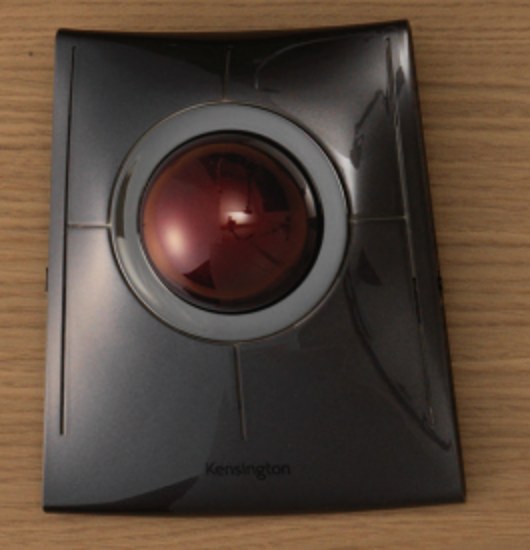
Kensington SlimBlade Pro trackball with 55 mm red ball
The large-ball ambidextrous pick

Kensington SlimBlade Pro

Best for: left- or right-handed users who want a flat central trackball, a 55 mm ball, and scrolling by twisting the ball.

Tradeoff: the scrolling gesture is unusual, and the broad low-profile body does not provide the EM03’s sculpted palm support.

Kensington supports Bluetooth, 2.4 GHz, and wired USB-C, plus button customization through Kensington software.

Check current price on Amazon
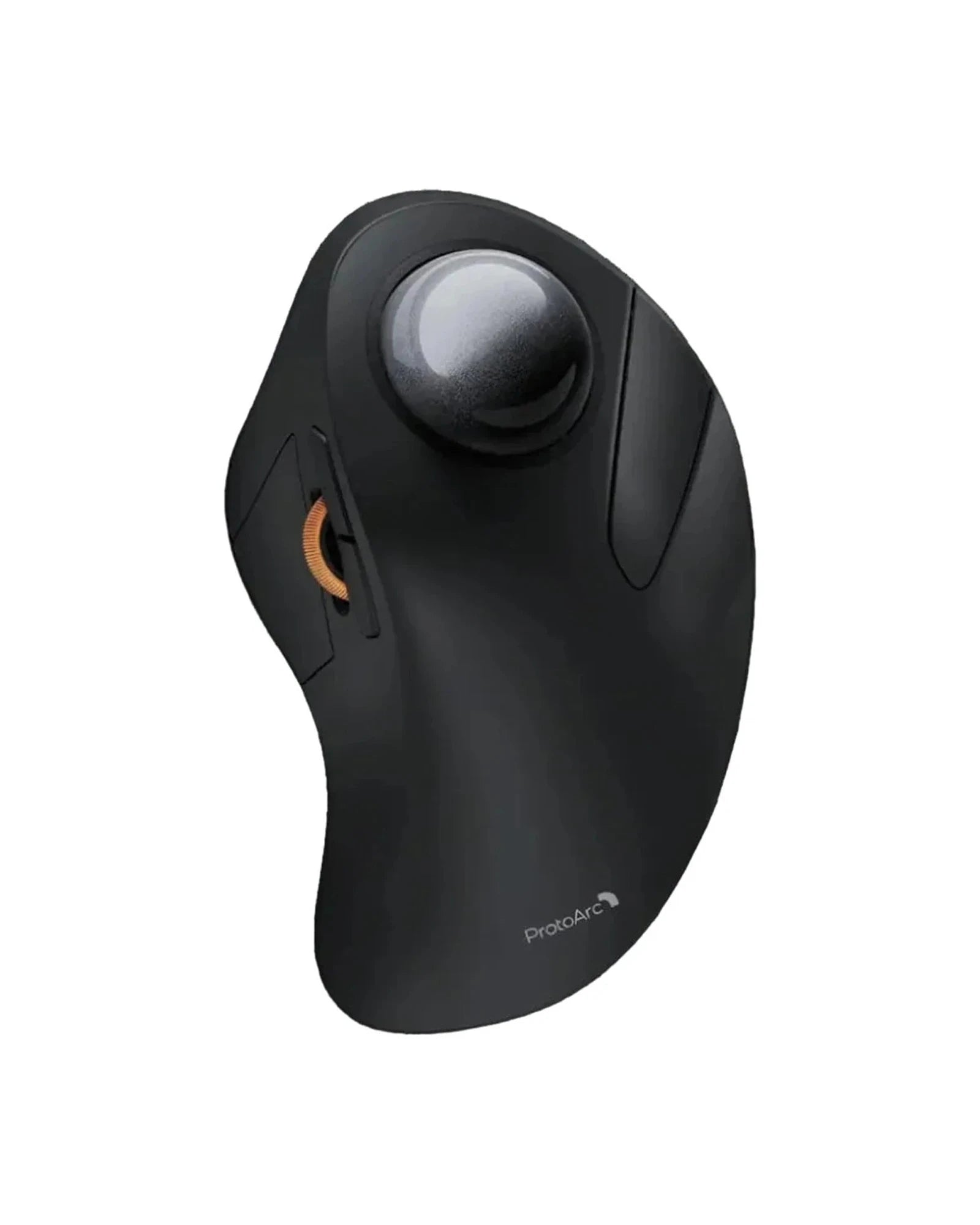
ProtoArc EM03 NL with gray 44 mm trackball
The familiar value pick

ProtoArc EM03 NL

Best for: a right-handed beginner who wants a conventional wheel, quiet clicks, and three-device switching.

Tradeoff: the 44 mm ball is smaller, the shell is not ambidextrous, and the maximum listed setting is 1,600 DPI.

EM03 combines one receiver channel with two Bluetooth channels and five hardware DPI steps from 200 to 1,600.

Check current price on Amazon

SlimBlade Pro vs ProtoArc EM03 decision specs

Only the differences that change control, fit, or connection are included.

Kensington SlimBlade Pro and ProtoArc EM03 differences
Decision point SlimBlade Pro EM03 NL Edge
Ball 55 mm, finger operated 44 mm, finger operated Kensington for larger ball
Scrolling Twist the trackball Dedicated scroll wheel Depends on preference
Hand orientation Ambidextrous Right-handed Kensington
Connections Bluetooth, 2.4 GHz, wired USB-C 2 Bluetooth plus 2.4 GHz Kensington for wired; EM03 for switching
Sensitivity Customizable in Kensington software 200 / 400 / 800 / 1,200 / 1,600 DPI EM03 for hardware steps
Battery Rechargeable Rechargeable; up to 60 days claimed EM03 publishes the clearer claim

The real difference is ball control and body shape

A 55 mm ball invites broader finger movement

SlimBlade Pro’s 55 mm ball is 11 mm larger in diameter than the EM03 ball. That gives more physical surface for fine movement and makes the twist-scroll gesture possible. It also makes the Kensington body wider and visually more like a desktop control surface than a mouse.

EM03 keeps a mouse-like wheel

ProtoArc separates pointer movement on the ball from vertical scrolling on a wheel. A new trackball user only needs to relearn cursor movement. SlimBlade adds a second unfamiliar action because the ball itself handles scrolling when twisted.

Ambidextrous and sculpted are opposite choices

Kensington’s symmetry allows either hand and makes occasional hand switching possible. EM03 shapes the shell around a right hand. That contour can feel more familiar to a mouse user, but it eliminates the left-handed case before software or DPI matters.

Connection modes solve different problems

SlimBlade Pro can remain connected by USB-C when wireless is undesirable. EM03 emphasizes three wireless channels for moving among computers and tablets. Decide whether the priority is a guaranteed cable fallback or a dedicated multi-device routine.

Which trackball shape fits your hand?

Left-handed primary use

SlimBlade Pro

The symmetrical body works without buying a separate orientation.

Precise scrolling on a fixed desktop

SlimBlade Pro

The 55 mm ball and twist gesture create the product’s distinctive workflow.

First move from a conventional mouse

ProtoArc EM03

A separate wheel leaves only cursor movement to relearn.

Laptop, desktop, and tablet rotation

ProtoArc EM03

Two Bluetooth channels and one receiver channel map cleanly to three devices.

What neither one fixes

Neither trackball removes the need for good cursor settings, clean ball bearings, and a reachable click position. Stationary control saves mouse-sweeping space, but it does not automatically fit every hand. Expect an adjustment period and keep the original mouse available while learning.

Cleaning is part of ownership because dust reaches the support points beneath either removable ball. The larger Kensington ball and smaller ProtoArc ball feel different, but neither stays smooth indefinitely without periodic cleaning.

A stationary ball also changes how selection and drag operations feel. Give either device several work sessions before judging precision, and change one DPI or software setting at a time so the adjustment remains understandable.

Neither device needs open space for repeated mouse sweeps.

Questions about SlimBlade Pro vs ProtoArc EM03

Is SlimBlade Pro or ProtoArc EM03 better for left-handed use?

Kensington SlimBlade Pro is the better left-handed choice because its low, symmetrical body is ambidextrous. ProtoArc EM03 is a sculpted right-handed trackball. A left-handed buyer should not treat ball placement alone as proof that the EM03 shell will fit the opposite hand.

How do SlimBlade Pro and ProtoArc EM03 scroll?

SlimBlade Pro scrolls when you twist its 55 mm ball around the vertical axis. ProtoArc EM03 uses a conventional thumb-operated scroll wheel beside its 44 mm index-finger ball. Kensington’s method keeps scrolling on the ball; ProtoArc’s method feels more like a standard mouse.

Can either trackball connect to three devices?

ProtoArc EM03 explicitly provides one 2.4 GHz receiver channel and two Bluetooth channels for three-device switching. SlimBlade Pro supports Bluetooth, a 2.4 GHz receiver, and wired USB-C, but those modes are primarily alternative connection paths rather than the EM03’s dedicated three-device switching layout.

Which trackball is easier for a beginner?

ProtoArc EM03 is the more familiar transition because it has a standard scroll wheel and a smaller 44 mm ball in a shaped right-handed shell. SlimBlade Pro asks you to learn ball-twist scrolling, but its flatter ambidextrous design and larger 55 mm ball reward buyers who want that specific interaction.